
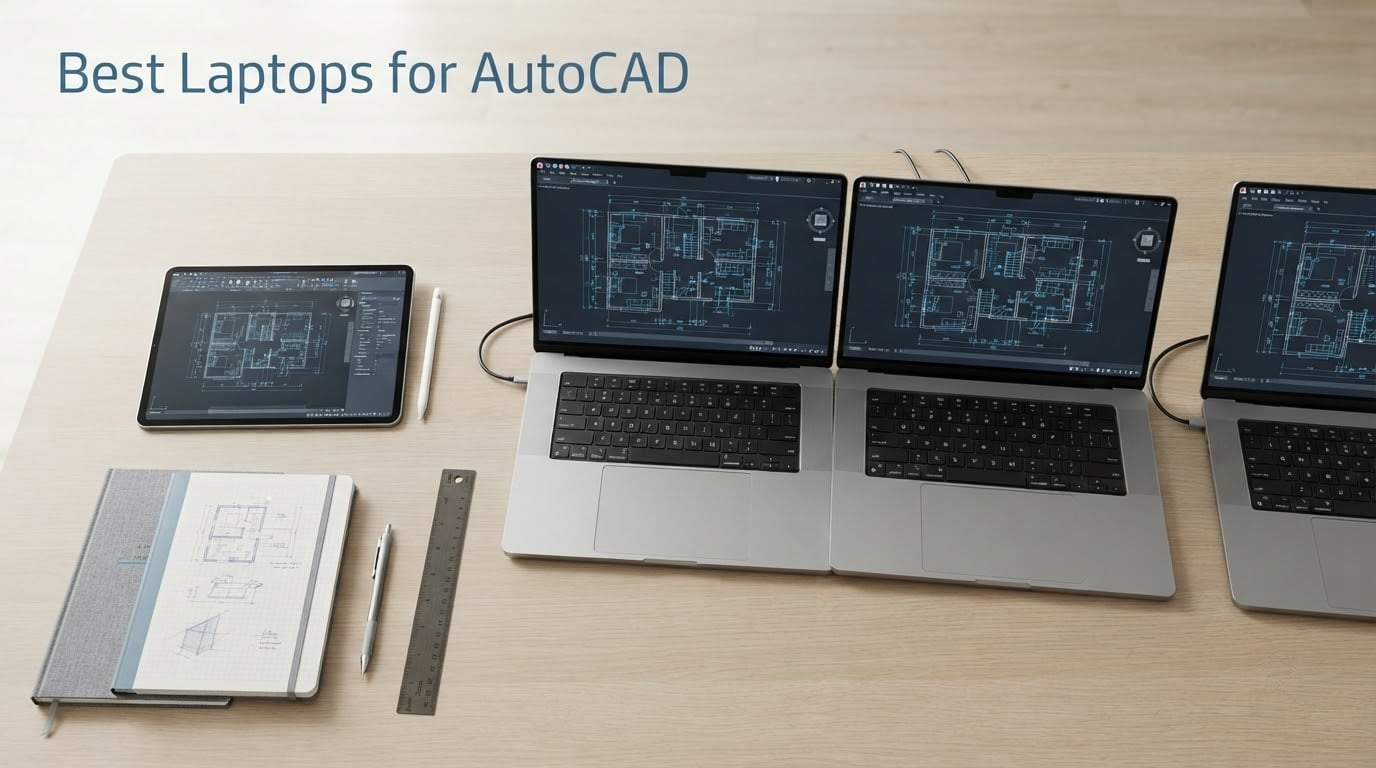
If you only read one line from this guide, read this one: the Lenovo Legion 5 16 with Intel Core Ultra 9 275HX and GeForce RTX 5060 8GB is the best laptop for AutoCAD in 2026 for most people. It pairs a 24-core chip that boosts to 5.4GHz with 32GB of DDR5-5600 and a sharp 16-inch 2560×1600 panel, and its 5.0 rating across 15 reviews tells you the spec sheet is not wishful thinking.
That recommendation comes with one honest caveat, and it is the caveat this whole article is built around. AutoCAD is two different programs depending on what you are drawing. Pure 2D drafting is CPU-bound and will happily run on almost any modern laptop, while 3D modeling, Civil 3D and rendering push the load onto the GPU and into RAM. A machine that feels instant in 2D can stutter badly on a 10,000-object model, which is why picking a laptop by price alone is how people end up disappointed.
Our team spent the last several weeks comparing ten laptops across CPU clock speed, core count, VRAM, memory, upgradability and display geometry, then mapped each one to the AutoCAD workload it actually suits. Specs come from manufacturer listings and from verified customer review data. We did not benchmark these machines ourselves, and we say so wherever a claim is a reviewer observation rather than a measurement.
One note before the picks: several of these laptops also show up in our guides to the best laptops for filmmakers and the best laptops for animation students. The overlap is real, but the priorities differ. A video laptop is judged on color accuracy and encoder throughput, while a CAD laptop is judged on clock speed, VRAM and how it behaves after hour three of sustained load.
Table of Contents
- Top 3 Best Laptops for AutoCAD in September
- All 10 AutoCAD Laptops at a Glance in 2026
- 1. Lenovo Legion 5 16 – Best All-Rounder for AutoCAD
- 2. HP ZBook 8 G1i – Best Compact Certified Workstation
- 3. Dell Precision 7680 – Best for Civil 3D, Plant 3D and BIM
- 4. Lenovo ThinkPad P16 Gen 2 – Best Screen and Upgrade Path
- 5. Lenovo ThinkPad P1 Gen 7 – Best for Site Visits
- 6. HP ZBook Studio G11 – Best Balance of Power and Weight
- 7. Dell Premium 16 – Best Canvas for 4K Drafting
- 8. ASUS TUF 15.6 RTX 4070 – Best for Students on a Gaming Chassis
- 9. Acer Nitro V 16S – Best Value for GPU-Heavy 3D
- 10. Acer Nitro V 15.6 – Cheapest Route to a Dedicated GPU
- What Specs Actually Matter for AutoCAD
- How to Choose an AutoCAD Laptop in 6 Steps
- Do You Need ISV-Certified Drivers for AutoCAD?
- Laptops to Avoid for AutoCAD
- Frequently Asked Questions
- Final Verdict: Which AutoCAD Laptop Should You Buy
Top 3 Best Laptops for AutoCAD in September

Lenovo Legion 5 16
- Intel Core Ultra 9 275HX
- 24 cores to 5.4GHz
- GeForce RTX 5060 8GB GDDR7
- 32GB DDR5-5600 RAM
- 16 inch 2560x1600 240Hz display

Acer Nitro V 16S
- AMD Ryzen 7 260 to 5.1GHz
- GeForce RTX 5060 8GB GDDR7
- 32GB DDR5-5600 RAM
- 16 inch 1920x1200 180Hz display

Dell Precision 7680
- Intel Core i7-13850HX
- 20 cores to 5.3GHz
- RTX 2000 Ada 8GB professional GPU
- 64GB DDR5 CAMM memory
- 2TB NVMe SSD
All 10 AutoCAD Laptops at a Glance in 2026
| Product | Specs | Action |
|---|---|---|
| Lenovo Legion 5 16 |
|
Check Latest Price |
 HP ZBook 8 G1i HP ZBook 8 G1i |
|
Check Latest Price |
| Dell Precision 7680 |
|
Check Latest Price |
 Lenovo ThinkPad P16 Gen 2 Lenovo ThinkPad P16 Gen 2 |
|
Check Latest Price |
 Lenovo ThinkPad P1 Gen 7 Lenovo ThinkPad P1 Gen 7 |
|
Check Latest Price |
 HP ZBook Studio G11 HP ZBook Studio G11 |
|
Check Latest Price |
 Dell Premium 16 Dell Premium 16 |
|
Check Latest Price |
 ASUS TUF 15.6 RTX 4070 ASUS TUF 15.6 RTX 4070 |
|
Check Latest Price |
| Acer Nitro V 16S |
|
Check Latest Price |
 Acer Nitro V 15.6 Acer Nitro V 15.6 |
|
Check Latest Price |
A quick note on the table: the four RTX Ada cards in it are ISV-certified workstation GPUs, while the RTX 4050, 4070 and 5060 cards are consumer GeForce parts. We explain what that difference means for AutoCAD later in this guide, because it is the single most misunderstood spec in this list.
1. Lenovo Legion 5 16 – Best All-Rounder for AutoCAD
Lenovo Legion 5 16″ WQXGA 240Hz Gaming Laptop, Intel Core Ultra 9 275HX; NVIDIA GeForce RTX 5060 8GB GDDR7; 32GB DDR5 RAM; 1TB NVMe M.2 SSD; Gigabit LAN, 2×2 WiFi 7
24-core Intel Core Ultra 9 275HX to 5.4GHz
RTX 5060 8GB GDDR7
32GB DDR5-5600
16 inch 2560x1600 240Hz IPS
Pros
- Highest core count here at 24 with turbo to 5.4GHz
- Sharp 2560x1600 500-nit 240Hz panel
- 32GB DDR5-5600 and 1TB NVMe as standard
- Perfect 5.0 rating across 15 reviews
- Gigabit Ethernet plus Wi-Fi 7 is rare at this size
Cons
- GeForce RTX 5060 carries no ISV certification for professional CAD
- Windows 11 Home rather than Pro for fleet deployment
- 5.4-pound chassis is heavy for a 16-inch laptop
The Legion 5 16 solves the AutoCAD laptop problem in the least dramatic way possible, which is why it is our top pick. Its Intel Core Ultra 9 275HX runs 24 cores and boosts to 5.4GHz, which is exactly the high-clock-speed, high-core-count profile that AutoCAD rewards on both 2D and 3D work. Nothing in the specification is filler.
What makes it better than the other RTX 5060 machines here is the panel. A 2560×1600 IPS display at 500 nits and 240Hz gives you a 16:10 canvas, and that extra vertical space is the single most underrated AutoCAD upgrade you can buy. The ribbon plus the tool palettes plus model space all fit without the constant zooming that a 16:9 panel forces on you.
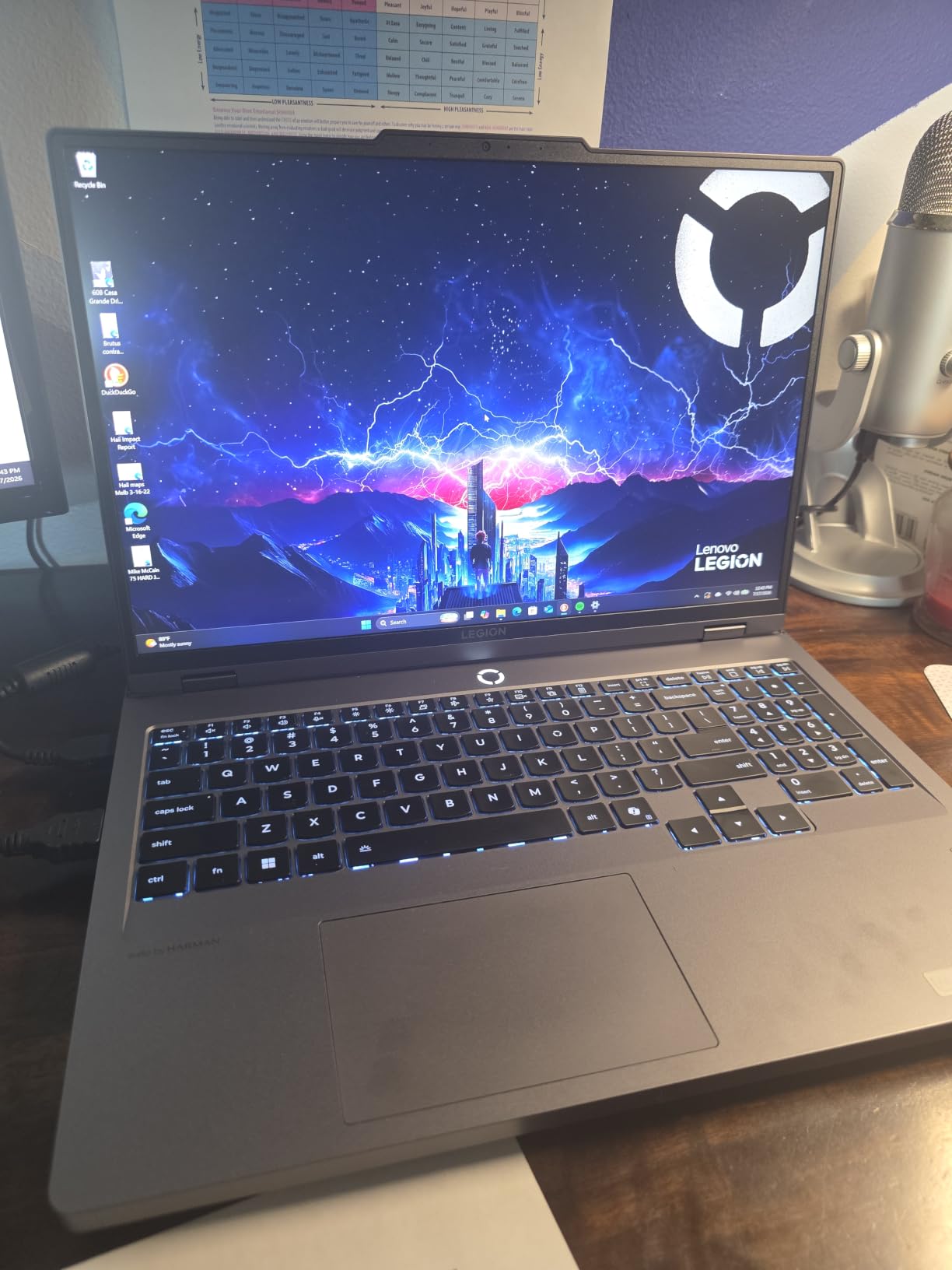
The RTX 5060 8GB is a consumer card, and that is the honest catch. It will drive 3D viewports, Enscape-style previews and AutoCAD’s hardware acceleration fine, but it is not ISV-certified, so you are relying on a driver that Autodesk did not validate for professional drafting. For a student or an independent designer, that trade is worth taking. For an engineering department running 200 seats, it is not.
Its 32GB of DDR5-5600 and 1TB NVMe cover a large drawing set and a 10,000-object 3D assembly with room to spare, and Gigabit Ethernet plus Wi-Fi 7 means it behaves like a docked machine when you are at a desk. Reviewers rate it a clean 5.0 across 15 reviews with no negative ratings recorded, which is a strong signal for a configuration this dense.
Who should buy the Legion 5 16
Buy it if you do 2D drafting, 3D modeling and occasional Civil 3D work and you want one machine that covers all three without a compromise. It is also the pick for a student or a small studio that needs raw throughput and cannot justify enterprise workstation pricing.
It is a particularly good match for anyone moving between a drafting desk and a client presentation, because 5.4GHz boost keeps interactive commands responsive even when Revit or Enscape is running in the background.
Who should skip the Legion 5 16
Skip it if your IT department mandates Windows 11 Pro, vPro manageability or a fleet-wide certified driver image. The configuration runs Windows 11 Home, and no amount of software upgrades you make later changes the fact that the GPU is uncertified.
Skip it if you carry the laptop daily. At 5.4 pounds with a 16-inch footprint, this is a machine that lives on a desk, not a shoulder.
2. HP ZBook 8 G1i – Best Compact Certified Workstation
HP ZBook 8 G1i Laptop, 16″ FHD+, NVIDIA RTX 500 Ada 4GB, Intel Ultra 7 255H
Intel Core Ultra 7 255H, 16 cores to 5.1GHz
RTX 500 Ada 4GB
32GB DDR5-5600 up to 64GB
1TB NVMe, 3.8 pounds, ISV certified
Pros
- ISV certified for AutoCAD
- SolidWorks
- Revit
- ANSYS and MATLAB
- 3.8-pound 16-inch chassis with full workstation internals
- Two RAM slots with headroom to 64GB
- Thunderbolt 4 and HDMI 2.1 for multi-monitor desks
- Three-year manufacturer warranty
Cons
- Only 4GB of dedicated VRAM limits heavy 3D and rendering
- 300-nit WUXGA panel is modest for color-critical work
- Very small public review base limits long-term reliability data
The ZBook 8 G1i is the answer for a specific and very common problem: you need a certified workstation but you also need to put the laptop in a bag on Thursday. At 3.8 pounds it is one of the lightest 16-inch machines here, and it carries an ISV certification for AutoCAD, SolidWorks, Revit, ANSYS and MATLAB, which is the certification that matters when your company has a hardware standard.
Under the hood it is a serious machine: an Intel Core Ultra 7 255H with 16 cores, 22 threads of capability, 24MB of L3 cache and boost to 5.1GHz, paired with 32GB of DDR5-5600 across two slots. Memory is the part that matters most for CAD, and this one leaves room to grow to 64GB without a warranty fight.
The RTX 500 Ada 4GB is the limiting factor and you should price that in before you buy. Four gigabytes of GDDR6 is fine for 2D drafting and moderate 3D, but it is the smallest VRAM allocation of any dedicated GPU in this roundup. Push a dense model with realistic materials or a rendering pass and VRAM becomes the wall before CPU does.
The 16-inch WUXGA panel at 1920×1200 and 300 nits is the second compromise. It is 16:10, which is right, but the brightness is low for a machine this expensive, and the anti-glare coating will dim it further in a site trailer or a bright office. Port-wise you get two Thunderbolt 4 ports, HDMI 2.1 and RJ-45, which is enough for a two-monitor drafting desk without a dock.
Who should buy the ZBook 8 G1i
Buy it if corporate IT requires a certified, warrantied workstation and you refuse to carry a brick. Three years of manufacturer warranty and a certified driver stack are worth real money in an organization that supports hardware centrally.
It is also a strong choice for MEP and electrical drafters, since the certification covers Revit and ANSYS alongside AutoCAD.
Who should skip the ZBook 8 G1i
Skip it if your work is heavy 3D. Four gigabytes of VRAM is a hard ceiling that no amount of CPU or system memory works around, and the natural fix is a different machine, not a different configuration of this one.
Skip it if you do color-critical visualization. A 300-nit panel is a working screen, not a presentation screen.
3. Dell Precision 7680 – Best for Civil 3D, Plant 3D and BIM
Dell Precision 7680 Laptop, NVIDIA RTX 2000 Ada 8GB, i7-13850HX, 64GB DDR5
Intel Core i7-13850HX vPro, 20 cores to 5.3GHz
RTX 2000 Ada 8GB professional
64GB DDR5 CAMM memory
2TB NVMe, four 4K monitors
Pros
- 64GB of memory is rare and future-proofs large assemblies
- ISV-certified RTX 2000 Ada 8GB for professional design work
- 2TB NVMe speeds up project file access
- Drives four external 4K monitors with no dock
- vPro manageability and three-year on-site warranty
Cons
- 45% NTSC panel will frustrate architects doing visualization
- 5.9 pounds is the heaviest machine here
- Reviewers suggest stepping up a configuration for better long-term value
The Dell Precision 7680 is the most complete answer in this guide for anyone whose drawings have stopped being small. Sixty-four gigabytes of DDR5-5200 CAMM memory is the single largest allocation here, and it is the configuration that stops you from hitting a wall when a Civil 3D surface model or a coordinated Revit assembly pulls in linked references from six other disciplines.
The Intel Core i7-13850HX vPro is a workstation part with 20 cores boosting to 5.3GHz, and it pairs with the RTX 2000 Ada 8GB, an ISV-certified professional GPU. Every one of the 12 reviews is five stars, and the recurring theme is smooth behavior under demanding multi-application loads, which is precisely the Civil 3D and BIM experience.
Storage is 2TB of PCIe NVMe, and the machine drives four external 4K monitors at 60Hz without a docking station. For a drafting desk that means ribbon plus plan view plus schedule plus model space on four panels, with no dock in the loop and no extra power cabling.
Two things pull against it. The 16-inch FHD+ anti-glare screen covers only 45% NTSC, which is genuinely below what architects and interior designers want when they are checking material and lighting, and at 5.9 pounds this is the heaviest laptop in the group by a wide margin. It is a desktop that occasionally travels, not a portable workstation.
Who should buy the Precision 7680
Buy it if you open Civil 3D, Plant 3D or Revit models with heavy Xref chains, and if your organization runs managed fleets where vPro, a three-year on-site warranty and a certified driver image are part of the standard. The 64GB headroom means you probably will not need to replace it in three years.
It is also the right machine for a four-monitor drafting desk, since it does that without a dock.
Who should skip the Precision 7680
Skip it if you do presentation-grade visualization. A 45% NTSC panel is the wrong starting point if the laptop is going to double as a color reference.
Skip it if the laptop goes in a bag every day. No amount of memory compensates for 5.9 pounds and a 1.03-inch-thick chassis.
4. Lenovo ThinkPad P16 Gen 2 – Best Screen and Upgrade Path
Lenovo ThinkPad P16 Gen 2 Intel Core i7-14700HX, 20C, 16″ WQUXGA (3840 x 2400), 800 nits, 60Hz, 32GB RAM DDR5, 1TB SSD, NVIDIA RTX 2000, Backlit KYB, Fingerprint Reader, Windows Pro
Intel Core i7-14700HX, 20 cores to 5.50GHz
RTX 2000 Ada 8GB
32GB DDR5 in 4 slots up to 128GB
16 inch 3840x2400 at 800 nits
Pros
- Sharpest and brightest panel here at 3840x2400 800 nits HDR 400 100% DCI-P3
- Four RAM slots up to 128GB plus two M.2 SSD bays
- RTX 2000 Ada 8GB pro GPU with a 20-core CPU
- Robust chassis suited to site and workshop use
Cons
- 4.58 kg makes it a desktop replacement
- 60Hz refresh rate is low for a premium panel
- One reviewer reports OneDrive file-path data loss on Windows 11
The ThinkPad P16 Gen 2 wins on the two things that quietly determine whether you enjoy working on a drawing all day: canvas size and color quality. A 16-inch WQUXGA panel at 3840×2400, 800 nits, HDR 400 and 100% DCI-P3 coverage is the best display in this roundup by a wide margin, and it means you can keep toolbars, palettes and model space visible at native resolution instead of zooming constantly.
Underneath, the 14th Gen Intel Core i7-14700HX delivers 20 cores with performance cores boosting to 5.50GHz, the highest clock speed of any laptop here. The RTX 2000 Ada 8GB professional GPU is ISV-certified and has 8GB of VRAM, which is double what the ZBook 8 G1i offers and exactly the headroom dense 3D work needs.
The upgrade path is the sleeper feature. Four SODIMM slots support up to 128GB of DDR5-4000, and there are two M.2 SSD bays, so you can double memory and storage after purchase without warranty risk. That changes the economics of buying, because a 32GB configuration today can become a 64GB configuration in a year.
It is also the most repairable-feeling machine here, and engineering users consistently favor the ThinkPad P-series for keyboard quality and build. Against that, the weight is 4.58 kg, the refresh rate is only 60Hz, and the 12 reviews average 4.2 with two specific complaints: a OneDrive file-path data loss incident and a unit sold as new with about eight months of warranty remaining. Check both at delivery if you buy one.
Who should buy the ThinkPad P16 Gen 2
Buy it if display quality is part of your job. Architects doing material studies, visualization teams checking color, and anyone who lives in zoom will feel the 3840×2400 panel more than any other spec in this list.
It is also the top pick for a buyer who intends to keep the machine for years, since 128GB of memory headroom and two SSD bays remove the two limits that most often force a laptop replacement.
Who should skip the ThinkPad P16 Gen 2
Skip it if you work from home and travel for a living. At 4.58 kg it is a desktop replacement, and the 60Hz panel means scrolling and viewport movement will not feel as fluid as it does on the 165Hz and 240Hz machines in this list.
Skip it if you buy from a reseller without a clear warranty statement, given the reported shortfall on one unit.
5. Lenovo ThinkPad P1 Gen 7 – Best for Site Visits
Lenovo ThinkPad P1 Gen 7 Intel Core Ultra 7 155H, 16C, 16″ WQXGA (2560 x 1600), IPS, 500nits, 165Hz 32GB RAM, 1TB SSD, NVIDIA RTX 2000 ada 8GB Backlit KYB, Fingerprint Reader, Windows Pro
Intel Core Ultra 7 155H, 16 cores to 4.80GHz
RTX 2000 Ada 8GB
32GB LPDDR5X-7500 CAMM2
0.67 inch chassis, 165Hz display
Pros
- 0.67-inch thin chassis is far more portable than other 16-inch workstations
- 165Hz 2560x1600 100% sRGB display
- Architects report strong real-world CAD performance and good battery life
- Runs three external monitors
Cons
- LPDDR5X CAMM memory is less upgradeable than SODIMM configurations
- One reviewer reports a non-working microphone in meeting apps
- One reviewer reports display flicker linked to the Wi-Fi 7 radio
The P1 Gen 7 is the mobile workstation answer, and the reason is one measurement: 0.67 inches thick at 13.95 by 9.49 inches. It is the thinnest 16-inch machine in this roundup by a considerable margin, and it does not achieve that by giving up the workstation GPU. You still get the ISV-certified RTX 2000 Ada with 8GB of VRAM.
Architects reviewing this configuration report strong real-world CAD performance, good battery life and a durable build, and the 4.8 average across 7 reviews is one of the highest in the group. The 165Hz 2560×1600 100% sRGB anti-glare panel is a good compromise between sharpness and outdoor usability, and it is noticeably more fluid than the 60Hz workstation panel on the P16.
It also handles three external monitors quickly, which means a thin-and-light travel machine can still become a proper three-screen drafting desk when you get back to the office. The Intel Core Ultra 7 155H provides 16 cores with performance cores at 4.80GHz, enough headroom for dense 2D and moderate 3D.
Two things to weigh. The 32GB of LPDDR5X-7500 sits on a CAMM2 module, which caps you at 96GB and is less flexible than the four SODIMM slots on the P16. And two reviewers report specific defects: a microphone that does not work in online meeting applications, and display flickering traced to electromagnetic interference from the Wi-Fi 7 radio. Test both on day one.
Who should buy the P1 Gen 7
Buy it if you are an architect or MEP engineer who splits the week between site and office. The combination of a genuinely thin chassis, a certified GPU and a fast panel is the rare combination that serves site documentation and desk drafting equally well.
It is also a strong pick for review calls and client presentations, since the 165Hz panel and reported good battery life make it a comfortable remote-working machine.
Who should skip the P1 Gen 7
Skip it if you plan to grow into very large assemblies and want maximum upgrade headroom. The CAMM2 memory ceiling of 96GB is real, and unlike the P16 you cannot add SODIMMs later.
Skip it if you depend on Wi-Fi in a dense RF environment and cannot tolerate any flicker risk. Two reports is a small sample, but the failure mode is annoying enough to test for.
6. HP ZBook Studio G11 – Best Balance of Power and Weight
HP ZBook Studio G11 Laptop, Ultra 7 165H, NVIDIA RTX 1000 Ada, 32GB/1TB
Intel Core Ultra 7 165H, 16 cores to 5.0GHz
RTX 1000 Ada 6GB
32GB DDR5-4800 up to 64GB
3.8 pounds, ISV certified
Pros
- ISV certified for AutoCAD
- Revit
- SolidWorks and ANSYS
- 3.8-pound chassis with workstation internals
- 6GB of VRAM is more than most 16-inch mobile workstations
- Triple-display support up to 8K via Thunderbolt 4
Cons
- 1920x1200 resolution is low for a premium workstation panel
- Only a single public review limits long-term reliability data
- Not Prime-eligible for the listed configuration
The ZBook Studio G11 is the answer if you want a certified workstation that you do not resent carrying. At 3.8 pounds with a 0.76-inch profile it is tied for the lightest machine here, and unlike most thin mobile workstations it keeps a real professional GPU: the RTX 1000 Ada with 6GB of GDDR6, which is more VRAM headroom than the compact ZBook 8 G1i offers.
The Intel Core Ultra 7 165H provides 16 cores, 22 threads and 24MB of L3 cache at up to 5.0GHz, and 32GB of DDR5-4800 sits in two slots with room to 64GB. Memory and GPU are both expandable in the right direction, which is what separates a workstation from a thin laptop that merely says workstation on the box.
It is ISV certified for AutoCAD, SolidWorks, Revit and ANSYS, and it ships with a 7-in-1 USB-C hub that covers HDMI, USB-C, USB-A, power delivery and an SD/TF card reader. For a draftsperson moving site drawings off a camera card, that bundled hub removes a purchase.
The screen is the weak point. A 1920×1200 IPS panel at 400 nits and 100% sRGB is accurate but small for a machine at this level, and it restricts how much drawing canvas you can show at once. The single public review also means there is not much long-term reliability data behind this configuration, which is worth factoring into any enterprise purchase.
Who should buy the ZBook Studio G11
Buy it if certification and mobility matter more to you than screen real estate. A 400-nit anti-glare 100% sRGB panel is readable on a site and in daylight, and the 8K60Hz triple-display support through Thunderbolt 4 turns it into a multi-monitor desk machine at the office.
It is a good fit for a field engineer who needs SolidWorks and ANSYS alongside AutoCAD without carrying two laptops.
Who should skip the ZBook Studio G11
Skip it if your drawings are visually complex. At 1920×1200 you will be zooming in and out constantly, and no amount of GPU power compensates for a small canvas.
Skip it if you are risk-averse about long-term support, given that this exact configuration has only one public review behind it.
7. Dell Premium 16 – Best Canvas for 4K Drafting
Dell Premium 16 (Previously XPS 16) High Performance Laptop, 16.3″ 4K OLED Touchscreen 15th Gen (Intel Ultra 7-255H, 32GB LPDDR5X, 1TB M.2 SSD, GeForce RTX 5050, Fingerprint, Backlit KB, Win 11 Pro)
Intel Core Ultra 9-285H, 16 cores to 5.4GHz
GeForce RTX 5060 8GB GDDR7
32GB LPDDR5X soldered
16.3 inch 3840x2400 OLED touch at 120Hz
Pros
- Largest and sharpest working canvas here at 16.3 inch 4K OLED touch
- Ultra 9-285H with 5.4GHz boost pairs well with RTX 5060 8GB for 3D
- 32GB LPDDR5X and 1TB PCIe SSD cover demanding datasets
- Three Thunderbolt 4 ports support extensive external displays
Cons
- 32GB LPDDR5X is soldered and cannot be upgraded
- OLED touch panel draws more power
- trimming battery life
- GeForce RTX 5060 is not ISV-certified for professional CAD
The Dell Premium 16 gives you the biggest, sharpest drawing canvas in this guide: a 16.3-inch 3840×2400 OLED touchscreen running at 120Hz. For anyone who lives in model space, that combination of resolution, contrast and refresh rate does more for daily comfort than an extra four cores of CPU would.
Underneath, the Intel Core Ultra 9-285H provides 16 cores including six performance cores, with boost to 5.4GHz, paired with a GeForce RTX 5060 8GB GDDR7. Reviewers describe the pairing as well suited to GPU-accelerated AutoCAD, rendering and other AI-assisted tasks, and the 4.6 average across 6 reviews reflects that, with the more critical feedback aimed at value and sustained-load thermals rather than outright capability.
Connectivity is genuinely good for a desk: three Thunderbolt 4 ports, an SD card reader for site file transfer, and a 99 watt-hour battery paired with a 130W supply. The SD reader is a small detail that matters more to a civil surveyor than any benchmark number.
There are two real limits. The 32GB of LPDDR5X is soldered onboard and cannot be upgraded, so 32GB is your ceiling for the life of the machine. And the RTX 5060 is a consumer card with no ISV certification, so the driver stack is uncertified for professional drafting work, which rules it out for many managed enterprise environments.
Who should buy the Dell Premium 16
Buy it if your work is visual. Presentation boards, interior design layouts, architectural rendering passes and anything where you judge the drawing by eye will benefit from a 4K OLED canvas more than from any other spec in this list.
It is also a good creative crossover machine, and it slots neatly beside our guides to the best laptops for DaVinci Resolve and the best film school laptops if your work sits between drafting and rendering.
Who should skip the Dell Premium 16
Skip it if you need more than 32GB of memory eventually, because soldered LPDDR5X makes that a hard wall. Skip it if your organization requires a certified driver, since the GeForce card does not qualify.
Also consider the OLED panel’s power draw. A touchscreen of this type is more demanding on the battery, and that shows up on days when you are working away from a desk. A docking setup with two external displays makes more sense for a full drafting day than the built-in panel does.
8. ASUS TUF 15.6 RTX 4070 – Best for Students on a Gaming Chassis
ASUS TUF 15.6 i7 RTX 4070 Premium Gaming Laptop, 15.6″ FHD 1920 * 1080 144Hz, Intel i7-13620H (Beats Intel i9-12900), NVIDIA GeForce RTX 4070, 32GB DDR5, 1TB SSD, RGB Backlit Keyboard, Windows 11 Pro
Intel Core i7-13620H, 10 cores to 4.9GHz
GeForce RTX 4070 8GB
32GB DDR5-5600
15.6 inch 1920x1080 at 144Hz
Pros
- RTX 4070 8GB VRAM plus 32GB DDR5 for 3D drafting and rendering
- Quieter fans than expected for this performance class
- Two external monitors supported over Thunderbolt 4 and USB-C
- Tactile keyboard with a full number pad
Cons
- Recurring reports of loose screws and a bottom corner detaching after about 18 months
- One unit stopped powering on within months and needed warranty service
- 1080p 15.6-inch screen is small for detailed CAD
The ASUS TUF puts a GeForce RTX 4070 with 8GB of VRAM and 32GB of DDR5-5600 into a 15.6-inch chassis, and on raw hardware-per-pound for 3D work that is hard to argue with. The i7-13620H boosts to 4.9GHz across 10 cores and 16 threads, which is enough for AutoCAD 2D without hesitation and adequate for 3D.
It is also, from a purely practical standpoint, a very common student machine. One owner in the review data uses it for design work such as vehicle wrap design, and the 28-review average of 4.3 with 73% five-star suggests the configuration delivers what people expect. Two external monitors run over Thunderbolt 4 and USB-C DisplayPort without extra power cabling, which matters if you draft on a laptop screen but review on two bigger ones.
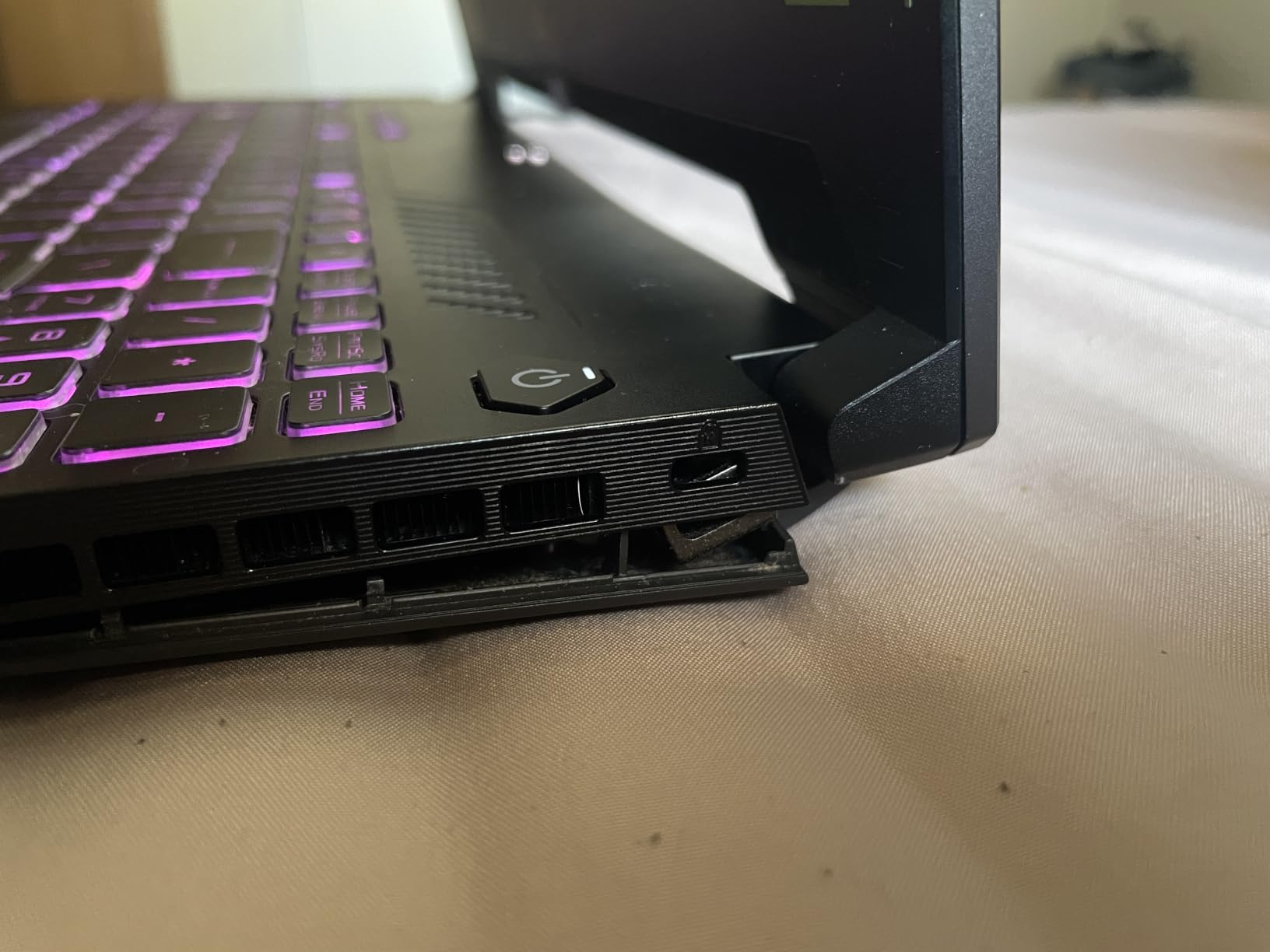
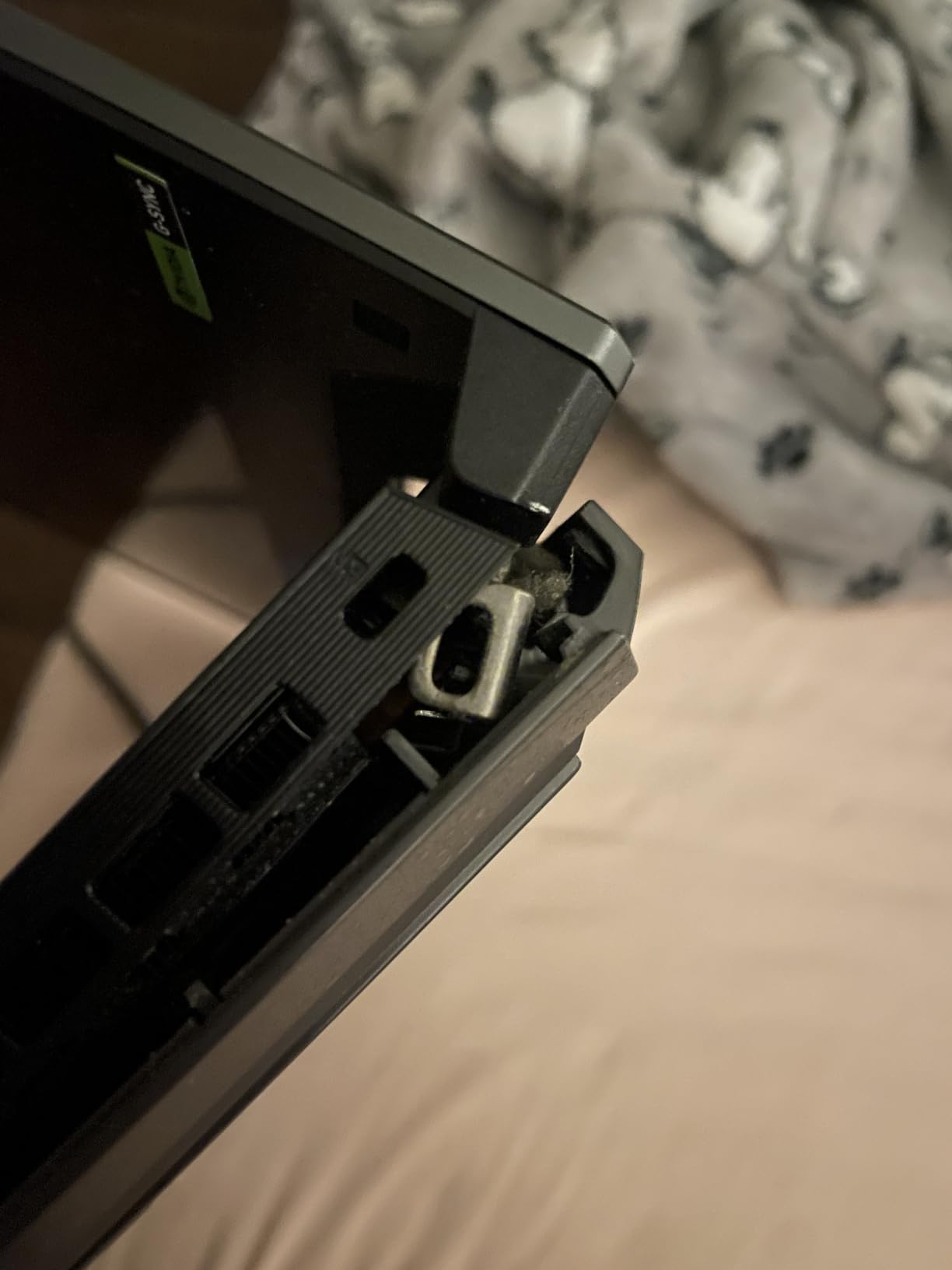
The durability complaints are the reason this is not higher. Several owners report loose or falling screws and a bottom corner that detached after roughly a year and a half, and one unit stopped powering on within months and needed warranty service. For a three-year architecture or engineering degree, a chassis failure in year two is a real cost, not an inconvenience.
The 15.6-inch 1080p screen is tied for the smallest canvas in the roundup, and 1080p is genuinely tight for detailed CAD work where you are zoomed into dimension text most of the day. The 90 watt-hour battery drains quickly under heavy load, which is another strike against taking it to a site.
Who should buy the ASUS TUF 15.6
Buy it if you are a student with a fixed hardware budget and a four-year horizon. The 8GB of VRAM lets you run 3D, rendering previews and Revit alongside AutoCAD, and a gaming chassis is a much better-value way to get that than a thin workstation.
It is a sensible pick for a second or shared machine, or for anyone who will replace it before the durability complaints have time to matter.
Who should skip the ASUS TUF 15.6
Skip it if you are buying once and keeping it for a decade, or if your machine travels to job sites. The repeated screw and chassis-panel complaints are consistent enough across reviews to treat as a pattern rather than noise.
Skip it if you do detailed dimension work on the built-in screen, since 15.6 inches at 1080p is the tightest canvas here against the alternatives.
9. Acer Nitro V 16S – Best Value for GPU-Heavy 3D
Acer Nitro V 16S AI Gaming Laptop | AMD Ryzen 7 260 Processor | NVIDIA GeForce RTX 5060 Laptop GPU (572 AI Tops) | 16″ WUXGA IPS 180Hz Display | 32GB DDR5 | 1TB Gen 4 SSD | Wi-Fi 6 | ANV16S-41-R2AJ
AMD Ryzen 7 260, 8 cores to 5.1GHz
GeForce RTX 5060 8GB GDDR7
32GB DDR5-5600
1TB Gen4 SSD, second M.2 slot
Pros
- Strongest hardware-to-cost ratio here with RTX 5060 8GB and 32GB DDR5
- 337 ratings give the second-largest reliability picture in the group
- 572 AI TOPS and DLSS 4 accelerate GPU-heavy 3D and rendering
- 16-inch 100% sRGB panel at 180Hz
- Second M.2 slot leaves room for storage expansion
Cons
- 1920x1200 resolution limits drafting canvas
- 32GB is the documented maximum RAM
- Consumer platform with no ISV certification
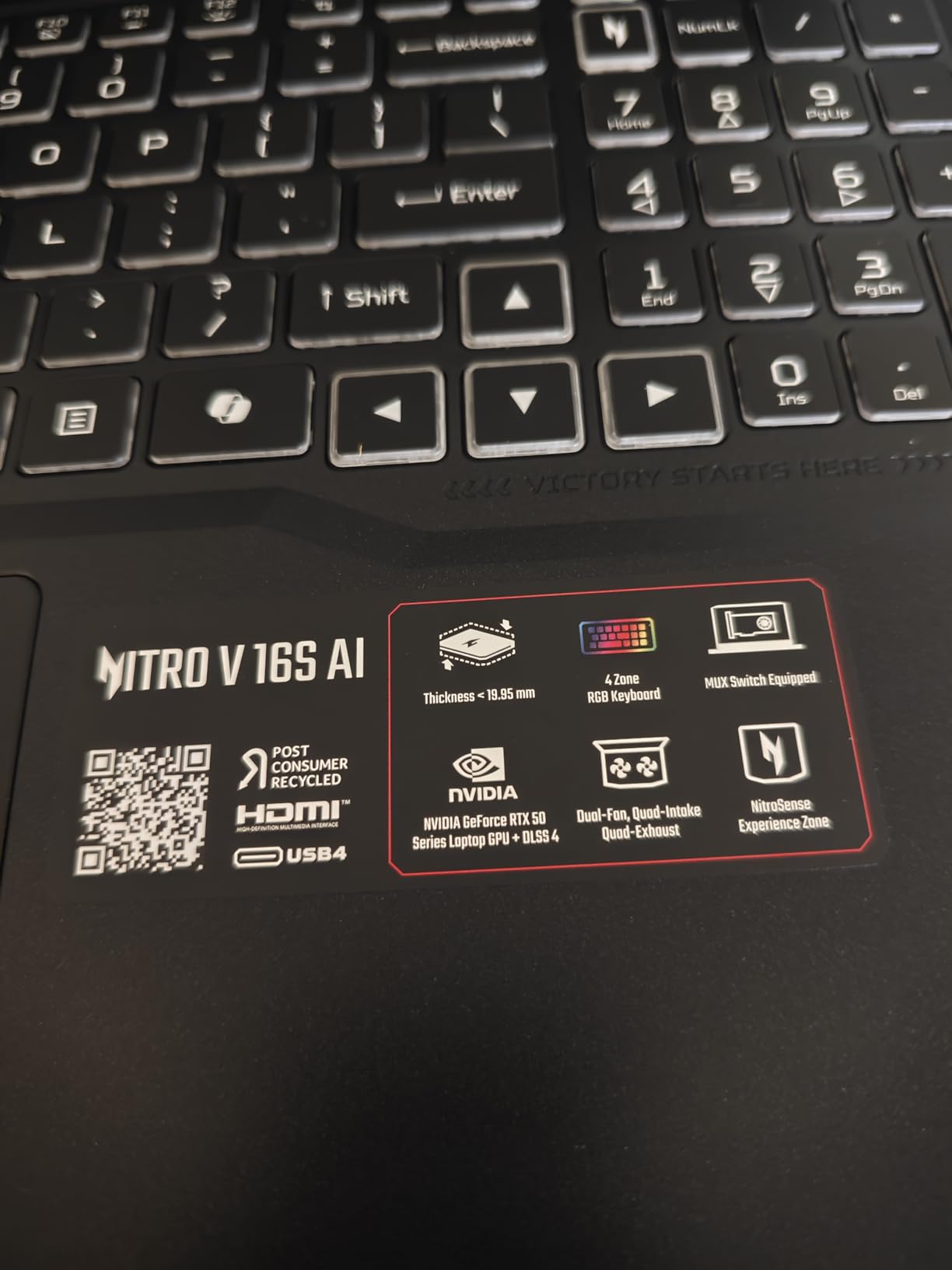
The Acer Nitro V 16S is the strongest value in this roundup, and the reason is the combination of an RTX 5060 8GB and 32GB of DDR5-5600 in a 16-inch chassis. You are buying the same GPU generation as our top pick with slightly fewer CPU cores, and the Ryzen 7 260 still boosts to 5.1GHz, which is the number that matters most for AutoCAD responsiveness.
The review base is what makes this pick unusually confident. 337 ratings averaging 4.4 is the second-largest dataset in the group, and 73% of those are five stars. Buyers repeatedly cite value, performance and smooth creative workloads, and the RTX 5060 Blackwell card’s 572 AI TOPS and DLSS 4 help on GPU-bound operations like rendering previews and material previews in 3D.

On AMD silicon specifically, the AutoCAD community consensus is settled: AutoCAD has historically been optimized for Intel, but plenty of users report running it on AMD for years without issue. An eight-core Ryzen 7 260 handles multitasking alongside 3D CAD work in practice, and the extra memory in this configuration matters more to AutoCAD than the core count does.
The negatives are consistent across reviews. The 1920×1200 panel is smaller than a full 1080p-class canvas and limits drafting area. Thirty-two gigabytes is documented as the maximum, so there is no upgrade path. And owners report fan noise and heat under sustained heavy load, which is exactly the failure mode that hurts a long rendering session.
Who should buy the Nitro V 16S
Buy it if GPU throughput per dollar is your priority and you do 3D modeling, visualization or rendering alongside AutoCAD. The 8GB of VRAM is the specification that pays off here, and you are getting a full generation of it.
It is also the pick for anyone who values knowing how a machine performs before buying. With 337 ratings, you have more real-world data on this configuration than on any other in the guide except the entry-level Nitro.
Who should skip the Nitro V 16S
Skip it if your organization requires ISV certification or Windows 11 Pro. It is a consumer platform on Home, and 32GB is a hard ceiling with no RAM upgrade available.
Skip it if you run long renders back to back, because sustained-load fan noise and heat are repeatedly reported and there is little thermal headroom in a 0.79-inch chassis.
10. Acer Nitro V 15.6 – Cheapest Route to a Dedicated GPU
Acer Nitro V Gaming Laptop | Intel Core i7-13620H Processor | NVIDIA GeForce RTX 4050 Laptop GPU | 15.6″ FHD IPS 165Hz Display | 16GB DDR5 | 1TB Gen 4 SSD | Wi-Fi 6 | Backlit KB | ANV15-52-76NK
Intel Core i7-13620H, 10 cores to 4.9GHz
GeForce RTX 4050 6GB
16GB DDR5 upgradable to 32GB
1TB Gen4 SSD, 4.7 pounds
Pros
- Lowest-cost route here to a dedicated GPU with 6GB of VRAM
- 356 ratings give the most reliable quality signal in the roundup
- Reviewers cite fast performance and easy setup
- Upgradable to 32GB RAM
Cons
- 16GB base RAM is low for large drawing sets and 3D assemblies
- Runs loud and warm under sustained load
- 15.6-inch 1080p screen is among the smallest in the group
The Acer Nitro V 15.6 is the cheapest way in this roundup to get a dedicated GPU into AutoCAD, and for 2D drafting that is all you actually need. The RTX 4050 brings 6GB of VRAM, which keeps hardware acceleration out of the integrated-graphics problem entirely, and the i7-13620H boosts to 4.9GHz across 10 cores for responsive command entry.
It also has the largest review base in the guide at 356 ratings averaging 4.6 with 83% five stars, so the reliability picture is better established here than anywhere else. Reviewers repeatedly mention fast performance, easy setup and smooth day-to-day operation, and one owner successfully paired it with an external gaming monitor for a larger canvas.
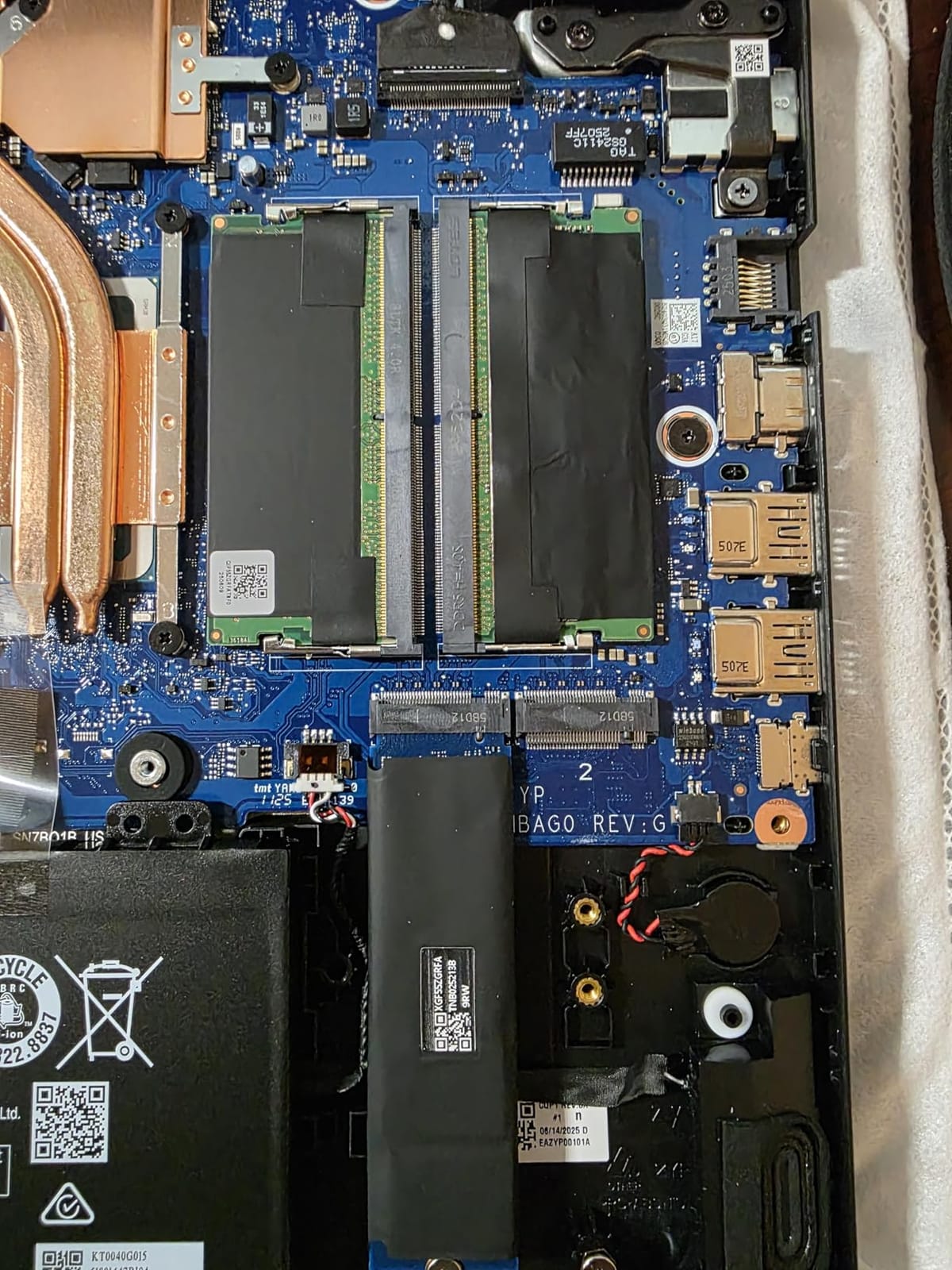
Two upgrades make it a serious 2D machine rather than a stopgap. Memory is upgradable from 16GB to 32GB across two slots, which is the single most effective AutoCAD upgrade you can make, and there is a full 1TB PCIe Gen 4 SSD with room to add a second drive later.
One more habit worth building before you commit to any configuration on this list. Open the Autodesk certified hardware list and check the exact model, because a low-end consumer card and a low-end certified workstation card behave very differently in the viewport and the driver releases are not the same.
Be clear-eyed about the rest. Sixteen gigabytes is the base configuration, which is tight the moment a 3D model or a large Xref chain appears. The machine runs loud and warm under sustained heavy load, with several reviewers recommending a cooling pad, and some report overheating and unexpected shutdowns. The 15.6-inch matte 1080p screen is the smallest canvas in the group, and the preinstalled Nitro utilities draw consistent criticism.
Who should buy the Nitro V 15.6
Buy it if you are doing 2D drafting, producing site documentation or working through an engineering or architecture degree on a fixed budget. Add the 32GB memory upgrade and you have a machine that comfortably clears AutoCAD 2D and light 3D for the length of a course.
At 4.7 pounds and 0.93 inches thick with a numeric keypad, it is also one of the few genuinely portable options here.
Who should skip the Nitro V 15.6
Skip it if you model in 3D daily. Six gigabytes of VRAM, 16GB of base memory and the smallest screen in the group are the wrong combination for dense models, and the thermal complaints make long renders worse.
Skip it if you dislike preinstalled vendor software, because the Nitro bloatware is not easily removed.
What Specs Actually Matter for AutoCAD
AutoCAD is CPU-heavy for 2D drafting and GPU-heavy for 3D, and the crossover happens faster than most buyers expect. In 2D, every command line, every crosshair movement and every zoom is a single-threaded operation, so raw clock speed on the leading core matters more than core count. This is why an eight-core chip that boosts to 5.1GHz can feel quicker in AutoCAD than a ten-core chip that tops out at 4.5GHz. Community consensus on r/AutoCAD has held for years that 2D drafting simply does not take much to run.
The moment you add solids, surface models, Civil 3D corridors, Plant 3D routing or any rendering pass, the load shifts onto the GPU and into system memory. VRAM becomes the ceiling that determines how large a model you can hold in hardware acceleration before AutoCAD starts falling back to software rendering. That is the whole reason a discrete GPU exists for CAD, and it is why a laptop with integrated graphics feels fine until the week it does not.
Here is the practical threshold we use. For 2D drafting and floor plans, a current Core i5 or Ryzen 5 class chip with 16GB of RAM and any NVMe SSD is enough. For 3D modeling with assemblies in the 5,000 to 10,000 object range, step up to a Core Ultra 7 or Ryzen 7 class processor boosting above 5.0GHz, a dedicated GPU with at least 6GB of VRAM, and 32GB of RAM. For Civil 3D, Plant 3D and Revit coordination with linked references, treat 32GB as the floor and 64GB as the sensible target, with 8GB of VRAM and a 2TB NVMe drive if project files are large.
Two spec categories get oversold. Resolution matters more than most reviewers admit, because AutoCAD needs vertical space for the ribbon, tool palettes and model space at the same time, which is why a 16:10 panel such as the 2560×1600 screen on the Legion 5 is a genuine productivity upgrade over a 16:9 alternative. Refresh rate is a comfort factor, not a speed factor, and 165Hz or 240Hz makes the interface feel more responsive without changing how fast a regen completes.
Clock speed deserves one more word because it is first priority. AutoCAD is largely a single-core application, and the vektrapc CAD workstation guidance in this space puts high clock speed at the top of the spec list ahead of core count. A machine that benchmarks well on multi-core work can still feel sluggish in AutoCAD if its single-core boost is low.
How to Choose an AutoCAD Laptop in 6 Steps
Start with clock speed, then work outward to GPU, memory, storage, screen and support. Here is the order we would actually shop in.
Set the clock speed floor. Look for a processor that boosts above 5.0GHz, such as an Intel Core Ultra 7 155H or 165H at 5.0GHz, a Core Ultra 9 275HX at 5.4GHz, or an AMD Ryzen 7 260 at 5.1GHz. Anything slower is fine for 2D and will feel it in dense 3D.
Decide whether you need a dedicated GPU. If you stay in 2D, integrated graphics are acceptable. If you model in 3D, render, or run Enscape-style previews, buy at least 6GB of VRAM and prefer 8GB.
Check certification against your employer. RTX 500 Ada, RTX 1000 Ada and RTX 2000 Ada cards are ISV-certified for AutoCAD and Revit. RTX 4050, 4070 and 5060 GeForce cards are not, which only matters if IT enforces it.
Pick your memory tier. 16GB is a 2D floor, 32GB is the sensible default for 3D, and 64GB is what large assemblies and Xref-heavy Civil 3D models demand. Then confirm the RAM is upgradable, since soldered memory is a permanent ceiling.
Prefer 16:10 and 16 inches, and check VRAM before pixels. Vertical screen space reduces zooming, but a 4K panel on a 4GB GPU will not help a dense 3D model. Canvas and VRAM solve different problems.
Budget for support and battery. A three-year warranty with onsite service and a battery sized for a full working day will save you more over four years than a faster GPU generation will.
One community tip deserves repeating because it is genuinely good advice and rarely appears in roundups. The top answer on the highest-ranking discussion in this space recommends buying a used ThinkPad P-series, on the grounds that they are engineering laptops. For a student on a budget who needs a certified workstation, a refurbished P-series is a defensible strategy, and it is worth checking the Autodesk certified hardware list before you buy anything from a vendor category page.
Do You Need ISV-Certified Drivers for AutoCAD?
You need certified drivers only if your organization requires them, and they matter for stability rather than raw speed. ISV certification means Autodesk validated that specific hardware and driver combination against its own test suite. Certified workstation cards such as the RTX 500 Ada, RTX 1000 Ada and RTX 2000 Ada in this guide, and older Quadro parts, have that validation.
What you gain is predictable behavior. Viewport stability, verified driver releases and a support path when something breaks in a 200-seat rollout. What you do not gain is a faster viewport in ordinary drafting, because a modern RTX 5060 has more raw graphics throughput than a lower-tier certified card.
Our guidance is straightforward. Individual drafters and students can confidently use a GeForce card, and five of the ten picks here are built that way. Corporate IT, architecture practices and engineering departments that standardize on a hardware image should buy certified cards, because the driver risk is a support risk and support risks are not the buyer’s problem to carry alone.
Laptops to Avoid for AutoCAD
Avoid any laptop with integrated graphics only, 8GB of memory, a spinning drive, soldered memory with no upgrade path, or a thin chassis with no sustained-load headroom. These are the disqualifying configurations, and each one fails for a specific reason rather than a vague feeling.
Integrated graphics only. Fine until the first 3D model, then you get software rendering. This is the most common regretted purchase in the AutoCAD community.
8GB of RAM, or 16GB that cannot be upgraded. A 32GB upgrade is the cheapest performance win available, and soldered memory removes it permanently. Several machines here solve this; a machine you cannot expand never will.
128GB storage or a mechanical hard drive. Project file access, shader compilation and autosave all live on the drive. A slow drive feels exactly like a slow processor.
Thin and light with a weak GPU that throttles. A laptop that benchmarks well for thirty minutes and then drops clocks will stutter on the long render, which is where you need it most.
Aesthetic machines bought on looks. This is a recurring theme in the forums, and the failure is almost always the same: underpowered hardware discovered in month three.
Any machine you plan to carry daily above 15.5 inches. Architects on these forums are consistent on this point, and the reasoning is simple enough that we agree with it. Anything larger stops being portable.
One more to avoid: a bundled CAD-software laptop where the discount comes with preinstalled software and an underpowered chassis. The software does not make the hardware faster.
Frequently Asked Questions
What specs should I look for in a laptop for AutoCAD?
Look for four things in order: a processor that boosts above 5.0GHz such as a Core Ultra 7 165H or Ryzen 7 260, a dedicated GPU with at least 6GB of VRAM for 3D work, 32GB of RAM with a real upgrade path, and a 1TB or larger NVMe SSD on a 16:10 display. Add an RTX Ada workstation card instead of a GeForce card only if your employer requires ISV-certified drivers.
Is CAD CPU or GPU heavy?
Both, but in different places. AutoCAD 2D drafting is single-threaded and CPU-bound, so clock speed on the leading core matters more than core count. 3D modeling, Civil 3D and rendering shift the load onto the GPU and into RAM, where VRAM becomes the limit. The crossover happens as soon as you leave 2D, which is why a mid-range laptop feels instant on a floor plan and struggles on a dense model.
What are the minimum laptop requirements for AutoCAD 3D?
For 3D, treat a current Core i7 or Core Ultra 5 class processor boosting near 5.0GHz as the floor, paired with a dedicated GPU carrying at least 6GB of VRAM and 32GB of system RAM. A 1TB NVMe SSD is the practical minimum for project files. Our picks above 6GB of VRAM all pair it with 32GB or more, which is the configuration we would actually buy.
What laptop should I stay away from for AutoCAD?
Avoid integrated-graphics-only machines, anything with 8GB of RAM, soldered memory with no upgrade path, storage of 128GB or a mechanical hard drive, and thin chassis that throttle under sustained load. Also be cautious with large-screen machines if you commute daily, since most architects recommend staying at or under 15.5 inches for portability.
Which laptop brand is best for CAD design?
For certified workstations, the three strongest lines are Lenovo ThinkPad P-series, Dell Precision and HP ZBook, all of which ship with ISV-certified RTX Ada graphics. For 2D drafting and student budgets, ASUS TUF and Acer Nitro gaming lines offer dedicated GPUs at far lower cost. ThinkPad P-series machines are also the most commonly recommended used option for engineering work.
How much RAM does AutoCAD need for large drawings?
16GB is enough for 2D drafting and modest 3D. Once a drawing set grows into 5,000 to 10,000 objects or Civil 3D and Revit models pull in linked references, 32GB becomes the practical floor and 64GB removes the ceiling entirely. Upgrade memory before anything else, because it is the cheapest performance gain available and it is the spec buyers most often cannot change after purchase.
Final Verdict: Which AutoCAD Laptop Should You Buy
The Lenovo Legion 5 16 is our pick for the best laptops for AutoCAD in 2026, because a 24-core processor at 5.4GHz, an RTX 5060 8GB, 32GB of DDR5 and a 16:10 2560×1600 panel cover 2D, 3D and light Civil 3D without a single weak link, and it holds a 5.0 rating across 15 reviews.
If your organization requires certified drivers, choose the Dell Precision 7680 for heavy Civil 3D and BIM work or the HP ZBook Studio G11 for mobility. If you are purely 2D and budget-limited, the Acer Nitro V 15.6 with 32GB of memory is the cheapest route to a dedicated GPU. The one rule that holds across all ten: buy for clock speed and memory first, and buy the screen you can actually see your drawing on.