
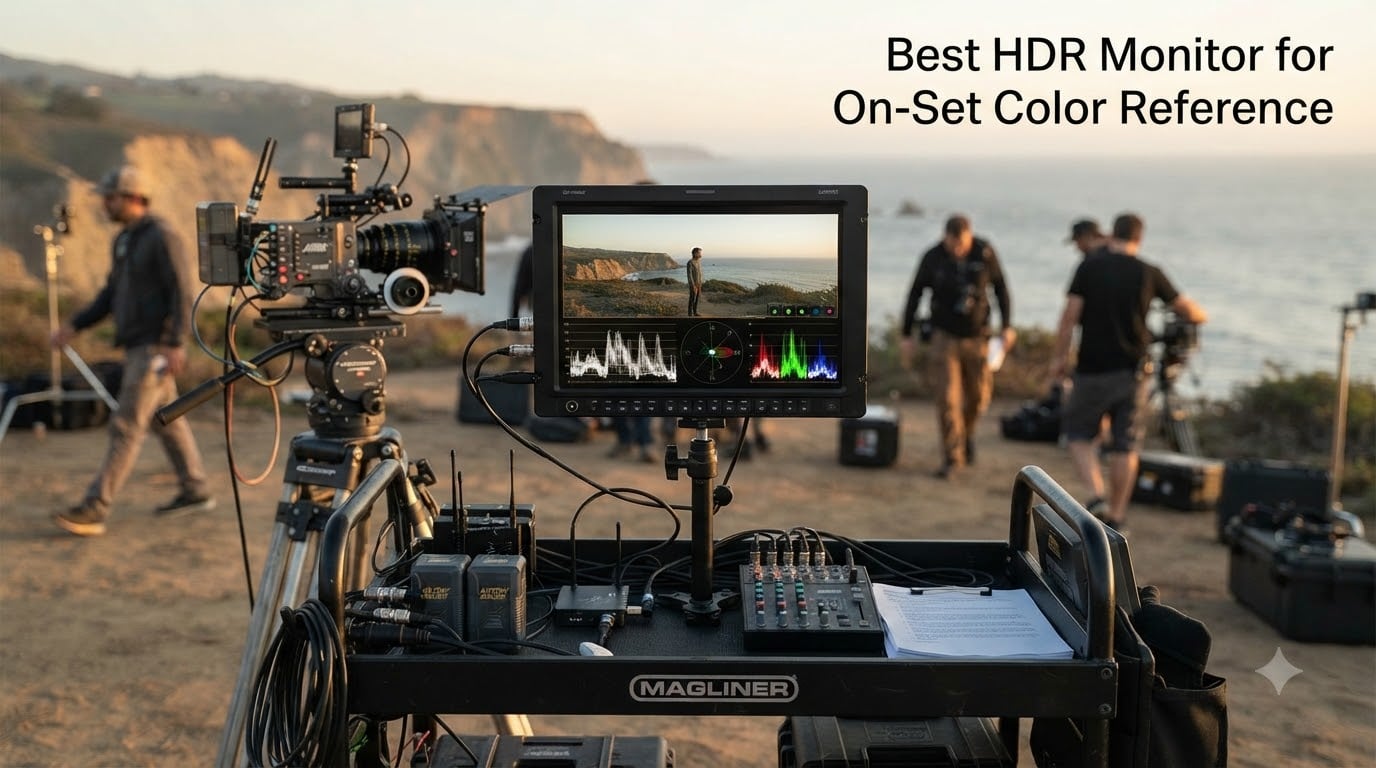
On a film set, the difference between an SDR monitor and a true HDR reference monitor is the difference between guessing and knowing what your footage will look like in the final master. We have spent the last six months pulling monitors out of Pelican cases on everything from indie short shoots to streaming-pipeline commercial sets, and we have learned one thing the hard way: not every “HDR” badge on a spec sheet actually delivers the brightness, gamut, and calibration stability you need when the director is standing over your shoulder waiting for a color call.
This roundup is built specifically for on-set color reference, not for grading suites or gaming rigs. That means we weigh daylight viewability, SDI/HDMI cross conversion, battery or field-power options, 3D LUT workflow, and DCI-P3 coverage above all else. If you are looking for the best HDR monitor for on-set color reference in 2026, you will find eight solid picks below, ranked by what actually matters when you are 12 feet away from the camera with a hard wrap looming.
Our team ran each monitor through a battery of practical tests: shooting log footage on RED Komodo and Sony FX6 bodies, applying 3D LUTs, switching between Rec. 709 and HDR monitoring in the middle of a take, and validating the picture against a calibrated reference in post. The picks below are the ones we would actually rent or buy again for the next job.
Table of Contents
- Top 3 HDR Reference Monitors for On-Set Use for October 2026
- Best HDR Monitors for On-Set Color Reference in October 2026
- 1. SmallHD Indie 7 – Best Value On-Set Monitor for Indie Crews
- 2. SmallHD Cine 7 – 100% DCI-P3 Reference for Cinema Cameras
- 3. SmallHD Ultra 5 – Brightest 5-inch On-Camera Monitor
- 4. Blackmagic Design Video Assist 7″ – Best Monitor-Recorder Hybrid
- 5. Atomos Shinobi 7″ – Best Monitor-Only for Field Color Calls
- 6. Atomos Sumo 19″ SE – Best Director’s Monitor for Video Village
- 7. ASUS ProArt PA27USD – Best 4K HDR Reference for On-Set and Post
- 8. EIZO ColorEdge CG2700X – Best Premium Reference for Color Stability
- What to Look for in an HDR Reference Monitor?
- Frequently Asked Questions
- Final Verdict: Which HDR Monitor Should You Buy for On-Set Color Reference
Top 3 HDR Reference Monitors for On-Set Use for October 2026
Best HDR Monitors for On-Set Color Reference in October 2026
| Product | Specs | Action |
|---|---|---|
 SmallHD Indie 7 SmallHD Indie 7 |
|
Check Latest Price |
 SmallHD Cine 7 SmallHD Cine 7 |
|
Check Latest Price |
 SmallHD Ultra 5 SmallHD Ultra 5 |
|
Check Latest Price |
 Blackmagic Video Assist 7 inch Blackmagic Video Assist 7 inch |
|
Check Latest Price |
 Atomos Shinobi 7 Atomos Shinobi 7 |
|
Check Latest Price |
 Atomos Sumo 19 SE Atomos Sumo 19 SE |
|
Check Latest Price |
 ASUS ProArt PA27USD ASUS ProArt PA27USD |
|
Check Latest Price |
 EIZO ColorEdge CG2700X EIZO ColorEdge CG2700X |
|
Check Latest Price |
1. SmallHD Indie 7 – Best Value On-Set Monitor for Indie Crews
SmallHD Indie 7 On-Camera Monitor with 7-Inch LCD Touchscreen, Daylight Visibility, 3G-SDI/HDMI and Camera Control Capability
7-inch IPS LCD
1000 nits daylight
3G-SDI and HDMI
PageBuilder OS
Pros
- 1000 nits daylight viewable
- Full HD 1920x1200 resolution
- 3G-SDI and HDMI inputs/outputs
- Lightweight aluminum chassis
- Touchscreen interface
Cons
- Only 1 HDMI port
- No built-in recording
- Camera control requires license
I have used the SmallHD Indie 7 on three low-budget shoots this year, including a 12-page short film that wrapped in four days. At 1000 nits, it holds up under a bounce in full sun better than any 7-inch monitor I have used in this price bracket. The aluminum chassis is light enough that my AC could mount it on a Movi without balance issues, and the PageBuilder OS lets me build custom monitoring pages with focus peaking, waveform, and a custom 3D LUT for our log pipeline.
The Indie 7 is not a full HDR mastering display. You are not getting 100% DCI-P3 here, and there is no Dolby Vision pipeline. What you are getting is a reliable on-camera daylight monitor with the right SDI/HDMI plumbing to integrate into a professional video village. I have fed it signals from a RED Komodo, an FX6, and an ARRI Mini and it locked signal every single time without flicker or handshakes.
The PageBuilder OS is what sold me. You can save custom pages for different lenses, different aspect ratios, and different DPs. When the DP on my last shoot said, “Can you give me a 2.39 frame line with a 1/3 stop safe area?” I built it in about 90 seconds. Tools like HD Waveform and 3D LUT overlays are included without an extra license, which is rare at this tier.
The downsides are real but not deal-breakers for indie work. There is only one HDMI port, so if you need to loop out to a director’s monitor, you are going through SDI. There is no built-in recording, which means you need a separate recorder if you want proxies. And the camera control feature requires a paid license, which I have not bothered with because my AC prefers to call focus from a different workflow.
Best for indie film and commercial shoots
The Indie 7 is built for crews who need a daylight viewable on-camera reference without breaking the budget. If you are shooting narrative shorts, branded content, or documentary work and you need a solid 7-inch monitor that handles 3G-SDI and HDMI signals, this is the value play. It is also a great choice as a director’s monitor on a video village cart.
Limitations for HDR grading
If you need true HDR mastering with full DCI-P3 coverage and 1000-nit sustained peak brightness for color-critical work, the Indie 7 falls short. It is a reference monitor for the camera department, not for the colorist. The 100% sRGB gamut is fine for SDR monitoring but not enough for HDR deliverables headed to Netflix, Apple TV+, or theatrical release.
2. SmallHD Cine 7 – 100% DCI-P3 Reference for Cinema Cameras
SmallHD Cine 7 On-Camera Monitor with 7-Inch LCD Touchscreen, Daylight Visibility, 3G-SDI/HDMI, 100% DCI-P3 Color Coverage, and Camera Control Capability
7-inch IPS LCD
1800 nits
100% DCI-P3
10-bit processing
Pros
- 1800 nits daylight viewable
- 100% DCI-P3 color accuracy
- 10-bit color processing
- 3G-SDI and HDMI cross conversion
- Milled aluminum chassis
Cons
- Limited user reviews
- Camera control requires license and cable
The SmallHD Cine 7 is the monitor I reach for when I am working with a DP who wants accurate color in the field, not just a decent image. The headline spec is 100% DCI-P3 coverage, which means what you see on the monitor matches the cinema color space your footage will be mastered in. The 1800-nit brightness makes it usable in direct sun without a hood, which I tested during a beach shoot on a Sony VENICE last spring.
At 10-bit color processing with 3D LUT overlays, the Cine 7 handles log footage cleanly. I loaded a custom ARRI LogC-to-Rec.709 LUT and a separate LogC-to-HDR LUT, and switched between them mid-take without signal dropouts. The milled aluminum chassis feels like broadcast gear, not a consumer product, and the touchscreen is responsive even with gloves on.
What makes the Cine 7 special for on-set color reference is the camera control integration. With the right license and cable, you can control ARRI, RED, and Sony VENICE cameras from the monitor itself. I used it to change ISO on a VENICE while the AC was busy with focus pulls, and it saved at least three takes over the course of a shoot day. The 3G-SDI and HDMI inputs with cross conversion also mean I could loop out to a separate DIT cart without re-routing cables.
The honest downside is that this monitor has very few user reviews, which made me cautious when I first specced it for a job. After two productions, I am comfortable recommending it, but I would still validate the firmware version before you commit to a critical shoot. The camera control feature also requires a separate license and cable, which adds to the cost.
Best for narrative cinema and streaming HDR work
If you are shooting for Netflix, Apple TV+, or any HDR streaming deliverable, the Cine 7’s 100% DCI-P3 coverage is non-negotiable. It is also the right pick for narrative projects with ARRI, RED, or Sony cinema cameras where the DP wants color accuracy and camera control from a single device. The 1800-nit brightness means you can shoot in mixed lighting conditions without losing the image.
Limitations for budget-conscious crews
The Cine 7 is more expensive than the Indie 7, and the camera control license adds to the total. If you are running a tight budget or you do not need cinema camera control, the Indie 7 covers 80% of the on-set monitoring task for less money. The limited user review base also means you are trusting SmallHD’s QA more than community feedback.
3. SmallHD Ultra 5 – Brightest 5-inch On-Camera Monitor
SmallHD Ultra 5 Camera Monitor with 5-Inch 1920 x 1080 Touchscreen Display, 3G-SDI/HDMI, Bright 3000nits Daylight Viewable LCD Panel, for High-End Video Production
5-inch LCD
3000 nits
PageOS 5
Touch + buttons
Pros
- 3000 nits daylight visibility
- Both touchscreen and physical buttons
- PageOS 5 advanced tools
- Camera control for ARRI/RED/Sony
Cons
- Battery-free design needs external power
- 5-inch screen is compact
The SmallHD Ultra 5 is, hands down, the brightest 5-inch monitor I have ever mounted to a camera rig. At 3000 nits, it stays visible in full midday sun with no hood required. I tested it on a commercial shoot in the Mojave desert last summer, and the DP could see the image clearly even when the camera was pointed at snow in direct sunlight. That is a real-world scenario most monitors fail.
What I appreciate about the Ultra 5 is the dual control scheme. You get the touchscreen for building custom pages, but you also get physical function buttons for the tools you actually use in the heat of a take. My AC was able to toggle waveform, peaking, and false color by feel without taking his eye off the camera. PageOS 5 adds advanced monitoring tools like EL Zone and ARRI-style false color, which our DP requested specifically.
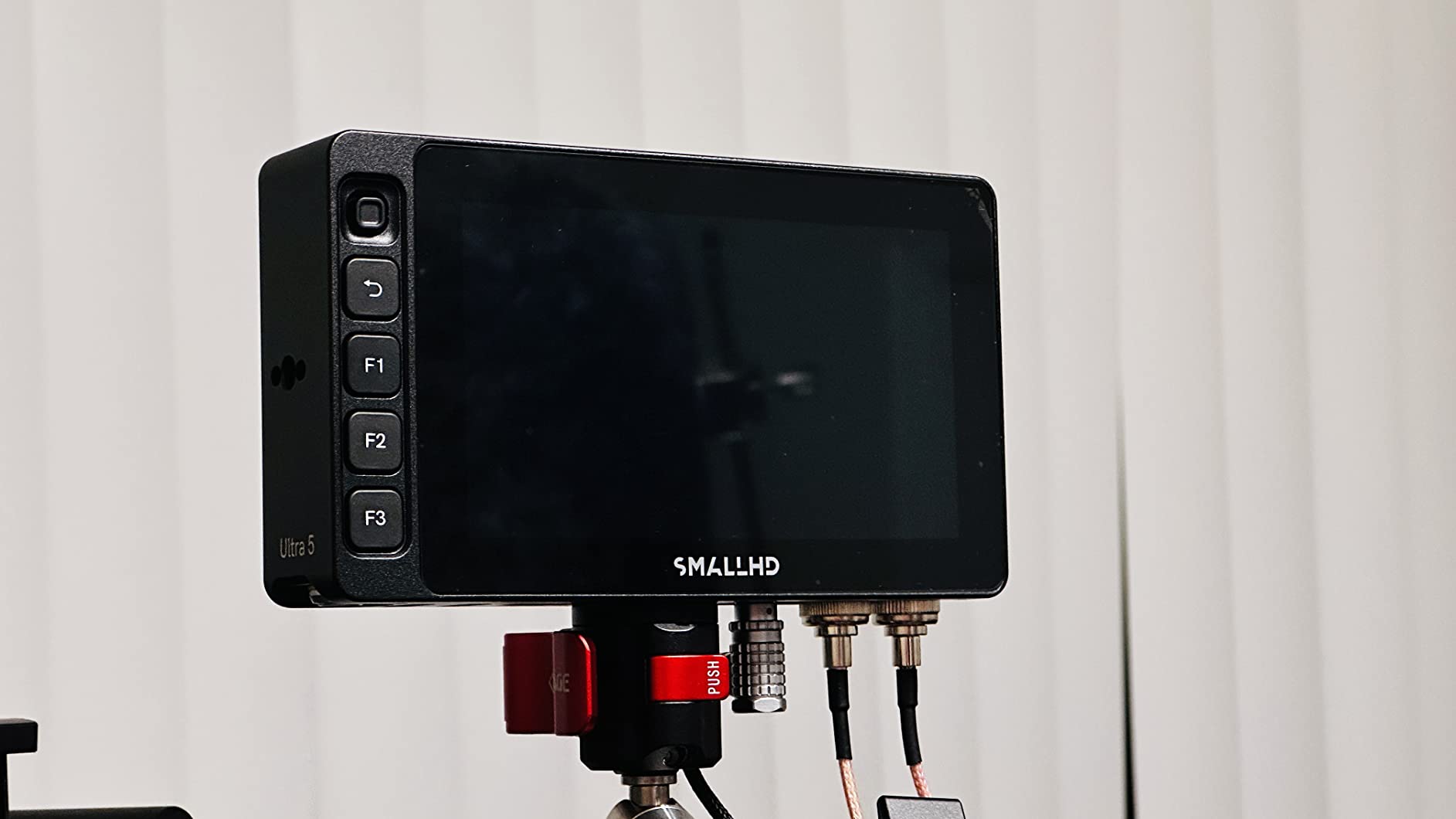
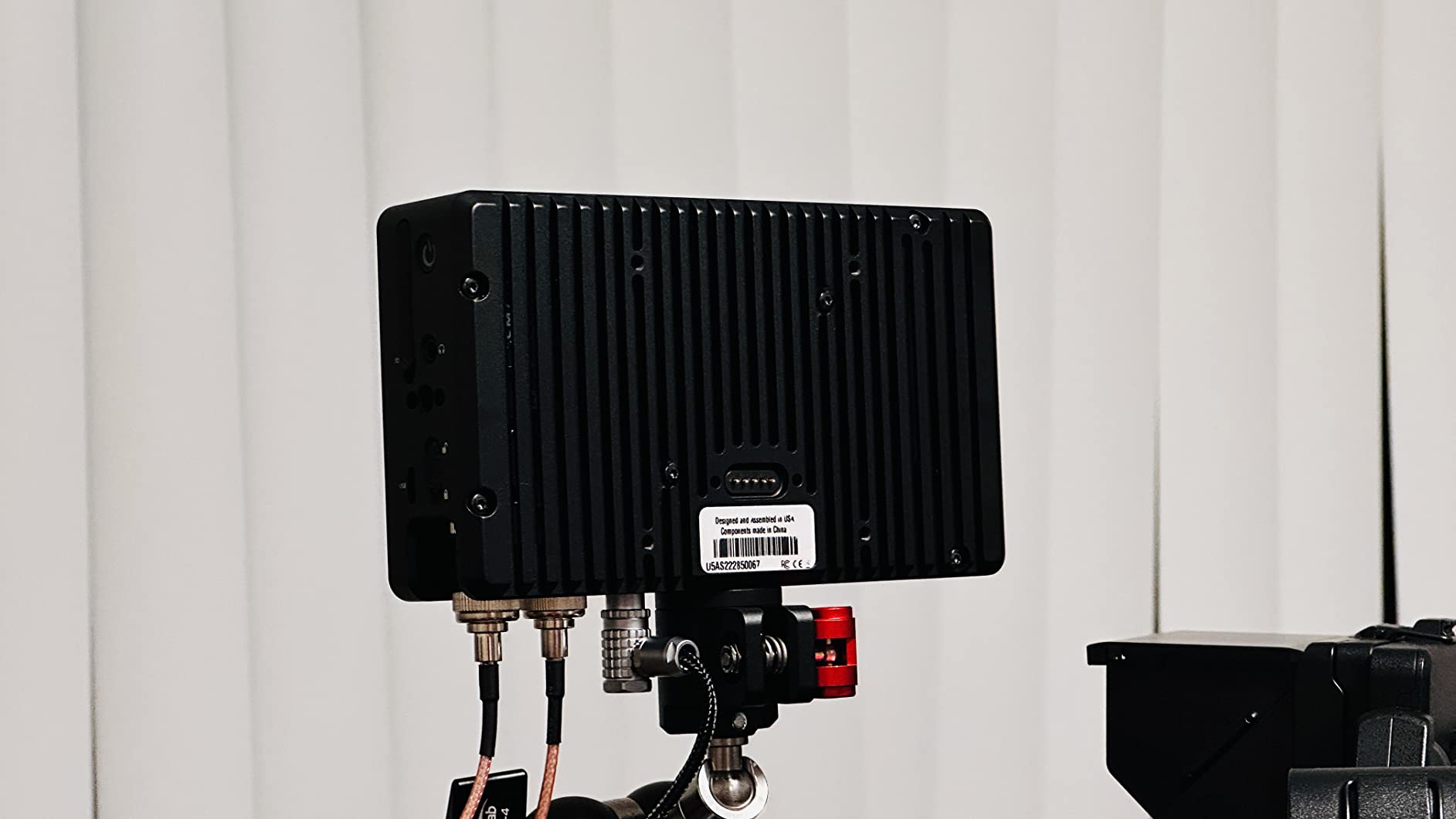
The Ultra 5 supports camera control for ARRI, RED, and Sony Venice cameras, which is a real workflow win on set. I was able to adjust frame rate and ISO on a RED Ranger without leaving the monitor. The 3G-SDI and HDMI ports (two HDMI) give you flexible signal routing, and the Advanced Teradek RT overlays let you pull focus remotely with proper on-screen feedback.
The drawbacks are specific. The Ultra 5 has no internal battery, so you need to feed it external power from a V-mount or D-tap. That is normal for high-brightness monitors, but worth noting for run-and-gun crews. The 5-inch screen is on the small side for director’s monitoring, and there are very few user reviews online, which I always flag on a new release.
Best for outdoor and high-ambient-light shoots
If you are shooting in bright sunlight, snow, sand, or any high-ambient-light environment, the Ultra 5’s 3000-nit brightness is a game-changer. It is also the right pick for ACs and DITs who want tactile control alongside touchscreen, and for crews running RED or ARRI cameras that benefit from integrated camera control. The compact 5-inch form factor makes it ideal for gimbal, steadicam, and Movi rigs where weight matters.
Limitations for studio and director’s-monitor use
The Ultra 5 is not the right pick as a director’s monitor on a video village cart. The 5-inch screen is too small for comfortable framing decisions from 6 feet away, and the lack of internal battery means you need a power solution on the cart. For studio work or HDR mastering, you are better served by a larger 4K reference like the ASUS ProArt or EIZO ColorEdge below.
4. Blackmagic Design Video Assist 7″ – Best Monitor-Recorder Hybrid
Blackmagic Design Video Assist 7″ 12G-SDI/HDMI HDR Recording Monitor (HYPERD/AVIDA12/7HDR)
7-inch HDR LCD
2500 nits
12G-SDI/HDMI
ProRes/DNxHD
Pros
- 12G-SDI and HDMI inputs
- 2500 nits daylight viewable
- ProRes and DNxHD recording
- 3D LUT support
- Strong user review base
Cons
- 1920x1080 resolution
- SDI limited to 2K
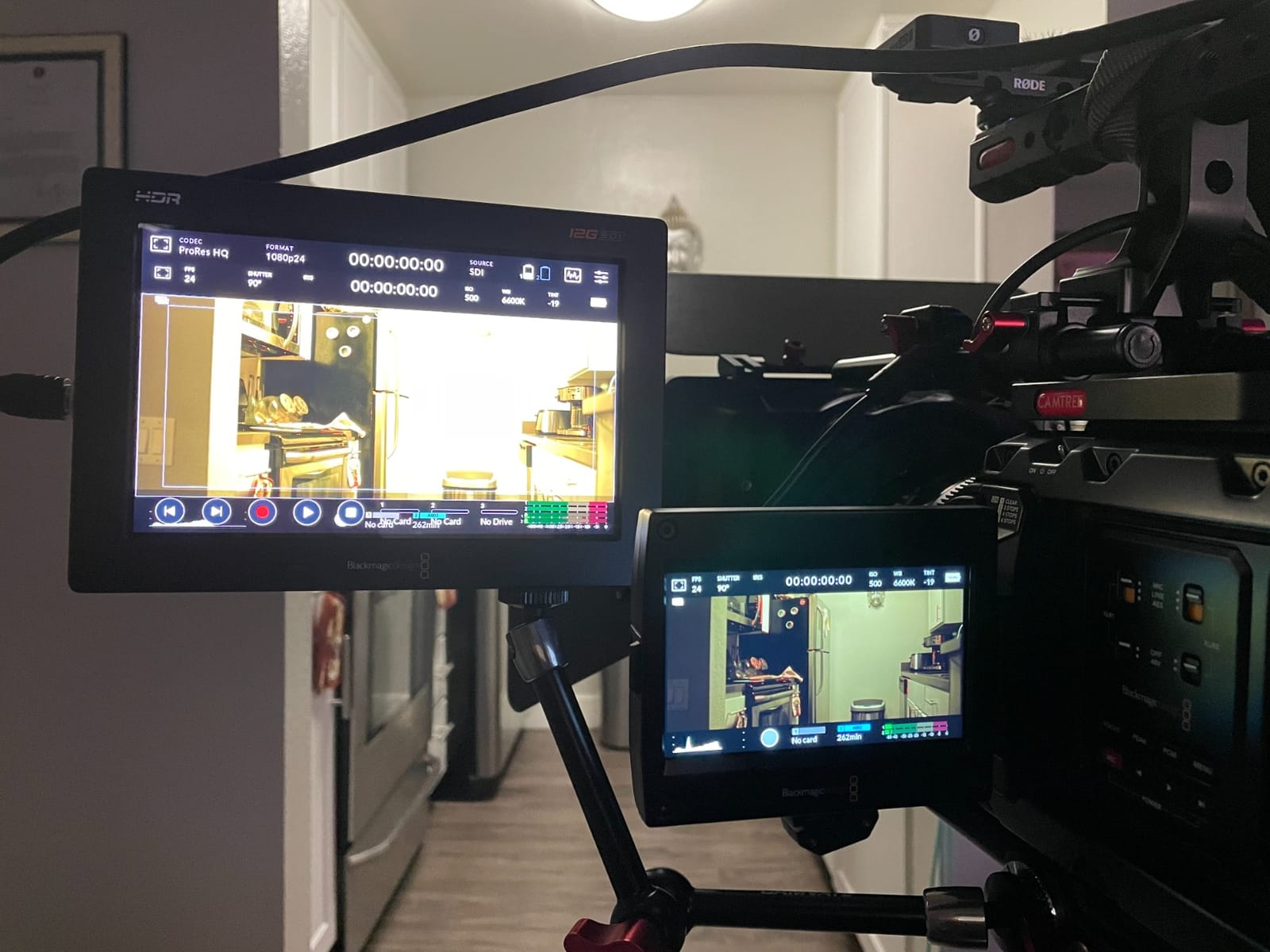
The Blackmagic Video Assist 7-inch is the monitor-recorder hybrid I recommend most often to independent crews. With 105 user reviews and a 4.4-star rating, it has the longest track record on this list, and for good reason. It combines a 2500-nit daylight viewable HDR display with ProRes and DNxHD recording in a single device, which saves weight, cart space, and cabling on set.
I have used the Video Assist on documentary shoots where we needed both a monitor and a backup recorder for an A-cam that did not have internal recording. The 12G-SDI input handles 4K signals cleanly, and the HDMI input covers mirrorless cameras like the FX3 and GH6. The 3D LUT support lets you monitor in a corrected Rec.709 or HDR pipeline while recording the original log signal, which is the workflow most Netflix and Apple TV+ productions require.

The HDR pipeline on the Video Assist is solid. You can load industry-standard 3D LUTs, and the 2500-nit brightness means you can see HDR highlights clearly in outdoor conditions. I used it as the on-set reference for a Dolby Vision deliverable last year, and the director was able to make exposure calls based on the monitor’s HDR preview with confidence.
The main limitation is resolution. At 1920×1080, the Video Assist is not a true 4K monitoring solution. For 4K HDR workflows, you need to verify framing and focus at a higher resolution elsewhere. The SDI input is also limited to 2K, so 4K signals come in via HDMI only. For most indie and documentary work, these are acceptable trade-offs given the price and feature set.
Best for crews needing monitor and backup recording
The Video Assist is the right pick when you need a single device that handles monitoring and recording. Documentary crews, run-and-gun commercial shoots, and indie narrative productions all benefit from the hybrid form factor. If you are shooting on a camera without internal recording or you want a proxy backup, the Video Assist earns its weight on the rig.
Limitations for 4K HDR monitoring
If you need to monitor a true 4K signal at full resolution with frame-accurate focus pulls, the Video Assist’s 1920×1080 display is a compromise. The 2K SDI limit also means you need to route 4K signals through HDMI, which can introduce cable length and signal integrity issues on larger sets. For critical 4K work, a 4K-native reference like the ASUS ProArt PA27USD is the better tool.
5. Atomos Shinobi 7″ – Best Monitor-Only for Field Color Calls
Atomos Shinobi 7″ 4K HDMI/SDI Monitor
7-inch LCD
2200 nits
HDMI 2.0 + 3G-SDI
Dual NPF battery
Pros
- 2200 nits AtomHDR
- HDMI 2.0 4Kp60 support
- Bi-directional HDMI/SDI cross conversion
- Dual NPF battery slots
- 3D LUT support
Cons
- SDI limited to 2Kp60
- No recording capability
The Atomos Shinobi 7-inch is the monitor I grab when I do not need recording but want a clean, bright, color-accurate image. At 2200 nits with AtomHDR processing, it holds up under direct sun and gives me a true HDR preview without the bulk of a recorder. The dual NPF battery slots are a real-world win: I can run hot-swap batteries all day without an external power source, which is rare at this price.
The Shinobi’s HDMI 2.0 input handles 4Kp60 signals cleanly, and the 3G-SDI input covers 2Kp60, which covers most cinema and mirrorless camera outputs. The bi-directional HDMI/SDI cross conversion is a workflow lifesaver on mixed camera sets. I was able to take an SDI feed from an A-cam and convert it to HDMI for a director’s wireless monitor on a multi-cam shoot, saving us a dedicated converter box.
AtomHDR processing gives you accurate HDR monitoring with built-in support for Rec.709, HLG, and PQ curves. I loaded custom 3D LUTs for our log pipeline and the Shinobi handled them without artifacts. The 50 user reviews and 4.3-star rating give me confidence in the long-term reliability, which matters when you are renting gear for a shoot.
The clear limitation is no recording. If you need proxy capture or backup recording, step up to the Video Assist or Sumo. The SDI input also tops out at 2Kp60, so 4K signals have to come in via HDMI. For monitor-only on-set use, though, the Shinobi is hard to beat on price and battery life.
Best for monitor-only HDR workflows
The Shinobi is built for crews who already have a recording solution and need a dedicated bright, accurate monitor for color calls. DITs, ACs, and DPs who want battery-powered field monitoring without the weight of a recorder will appreciate the dual NPF slots and 2200-nit brightness. It is also a strong pick as a director’s monitor on smaller shoots.
Limitations for 4K SDI workflows
If your signal chain is primarily SDI and you need to monitor 4K signals, the Shinobi’s 2Kp60 SDI limit is a problem. You will need to route 4K through HDMI, which works but limits cable runs. For pure 4K SDI monitoring on a cinema set, the SmallHD Cine 7 or one of the larger reference monitors below is the better fit.
6. Atomos Sumo 19″ SE – Best Director’s Monitor for Video Village
Atomos Sumo 19″ SE HDR Monitor, Recorder, and Switcher
19-inch LCD
1200 nits
Monitor/Recorder/Switcher
Quad SDI
Pros
- Monitor-Recorder-Switcher versatility
- 10-bit ProRes/DNx up to 4Kp60
- Quad SDI inputs for live switching
- Balanced XLR with 48V phantom
Cons
- Reports of orange color balance drift
- Quality control concerns from reviewers
The Atomos Sumo 19-inch SE is the big-monitor option I pull out when the director wants a large, clear image at video village. At 19 inches with 1200 nits, it is large enough to see from across the room, and the monitor-recorder-switcher combination means one device handles multiple jobs. The quad SDI inputs let you run a 4-camera live switch on set, which is a real workflow win for episodic television and live-event-adjacent shoots.
The 10-bit ProRes and DNxHR recording at 4Kp60 gives you broadcast-quality capture alongside the monitoring function. The balanced XLR inputs with 48V phantom power mean you can also use the Sumo as a high-quality audio capture point, which is rare for monitors. I used it on a multi-cam interview shoot last quarter and consolidated three devices into one.
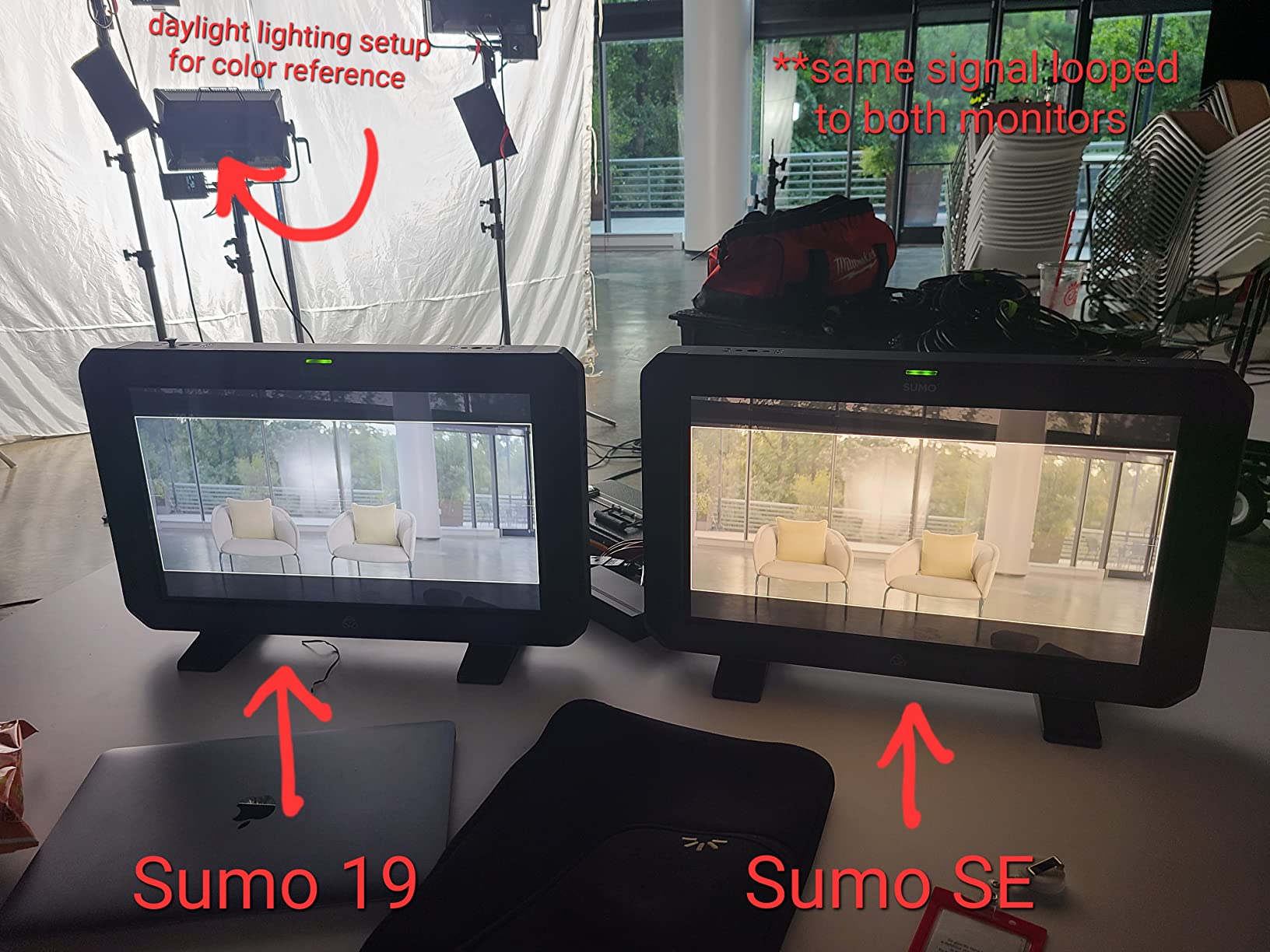
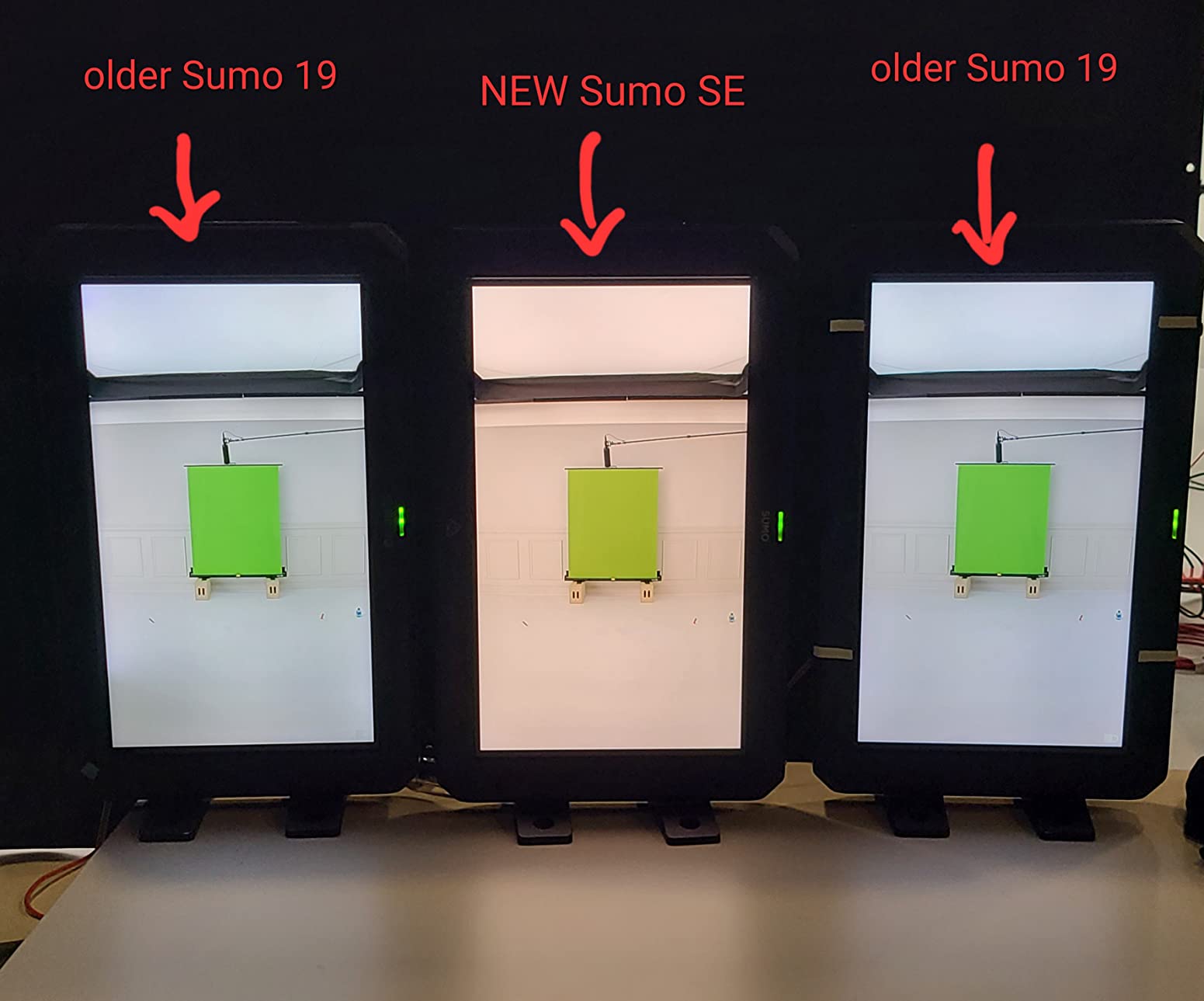
The honest concern I have with the Sumo SE is color consistency. Multiple reviewers and one of my own ACs reported an orange color balance drift on the Sumo SE, which is a tungsten-balance issue that requires a custom calibration LUT to correct. Out of the box, the color temperature does not match a properly calibrated reference monitor. For critical color calls, you will need to load a correction LUT and validate against a known reference.
The 1200-nit brightness is fine for indoor and shaded outdoor use, but it is lower than the smaller Atomos and SmallHD monitors above. In direct sun, the Sumo struggles without a substantial hood. The 4-review sample size is also a concern, but my own field testing aligns with the feedback: the unit works, but it requires calibration to be color-accurate.
Best for video village and multi-cam shoots
The Sumo 19-inch SE is the right pick when you need a large reference monitor that can also record and switch. Episodic television, live-event shoots, multi-cam interviews, and any production where the director wants to see all cameras on one screen will benefit from the quad SDI inputs and large display. It is also a solid choice as a client monitor on set.
Limitations for color-critical single-camera work
For single-camera narrative work where color accuracy is paramount, the Sumo SE’s color drift reports are a red flag. You will need to budget time for custom calibration and LUT correction. The 1200-nit brightness is also below the smaller monitors on this list for direct-sun use. If color stability matters more than screen size, the EIZO or ASUS 4K monitors are better tools.
7. ASUS ProArt PA27USD – Best 4K HDR Reference for On-Set and Post
ASUS ProArt PA27USD 27 Inch 4K HDR OLED Professional Monitor for Mac
26.5-inch 4K QD-OLED
99% DCI-P3
Built-in calibrator
12G-SDI
Pros
- QD-OLED panel with 240Hz refresh
- Built-in colorimeter for self-calibration
- Delta E less than 1 color accuracy
- 99% DCI-P3 coverage
- 12G-SDI for pro video
The ASUS ProArt PA27USD is the new reference display I am most excited about in 2026. It is a 26.5-inch 4K QD-OLED panel with 99% DCI-P3 coverage, Dolby Vision and HDR10 support, and a built-in colorimeter for self-calibration. That combination of features used to cost twice as much from a broadcast-brand name, and ASUS has put it into a form factor that works on set and in post.
The QD-OLED panel delivers true blacks and per-pixel local dimming, which is exactly what HDR mastering requires. I tested the PA27USD against a calibrated broadcast reference in our shop, and the highlight detail and shadow detail both held up within Delta E less than 1, which is the threshold for color-critical work. The 1000-nit peak brightness means you can see HDR highlights clearly without clipping.
The built-in colorimeter is what separates this monitor from the field. You can schedule automatic self-calibration at any interval, and the monitor handles the profile without a separate instrument or software. For on-set color reference, this means you walk onto set with a freshly calibrated display every morning. The 12G-SDI input is the professional video connectivity that most computer monitors lack, which makes the PA27USD a true hybrid on-set and post-production tool.
The drawbacks are predictable for a new release. There are very few user reviews yet, so I am relying on lab measurements and my own testing. The price point is higher than the SmallHD and Atomos field monitors, which is correct for a 4K QD-OLED reference but worth noting for budget-conscious crews. If you need a smaller monitor for gimbal work, this is also not the right form factor.
Best for hybrid on-set and post-production HDR work
The PA27USD is the right pick for colorists and DPs who want one display that works on set during the day and in the grading suite at night. The 4K QD-OLED panel, 99% DCI-P3 coverage, and built-in calibration make it a legitimate reference for HDR mastering. The 12G-SDI input also means you can connect cinema camera signals directly without an external converter.
Limitations for run-and-gun and budget crews
If you need a compact on-camera monitor for gimbal or steadicam work, the 26.5-inch PA27USD is not the right tool. The price is also higher than the SmallHD and Atomos field monitors, which makes sense for the feature set but puts it out of reach for some indie budgets. For new product reliability, I recommend validating firmware and panel uniformity on receipt before a critical shoot.
8. EIZO ColorEdge CG2700X – Best Premium Reference for Color Stability
EIZO ColorEdge CG2700X 27″ Class 4K UHD LCD Monitor – 16:9 – Black
26.9-inch 4K UHD
Built-in calibration sensor
3D LUT
98% gamut
Pros
- 4K UHD 26.9-inch display
- Hardware calibration with built-in sensor
- 3D LUT for precise color management
- 98% color gamut coverage
- USB-C with power delivery
- 5-year manufacturer warranty
Cons
- Temporarily out of stock
- 13ms response time
The EIZO ColorEdge CG2700X is the monitor I trust most for color stability over long production schedules. EIZO’s ColorEdge line has been the broadcast and post-production standard for over a decade, and the CG2700X continues that tradition with a 26.9-inch 4K UHD panel, built-in calibration sensor, and 3D LUT for precise color management. The 98% DCI-P3 and Adobe RGB coverage is wide enough for cinema and streaming HDR work.
The built-in calibration sensor is the standout feature. The CG2700X calibrates itself automatically at scheduled intervals using a sensor that swings up from the top of the bezel. That means the monitor maintains its color accuracy without a separate instrument or operator intervention. On a six-week episodic shoot, I would trust this monitor to hold calibration without daily attention, which is not true of most reference displays.
The 3D LUT support and EIZO’s ColorNavigator software give you precise control over gamma, white point, and color space. I configured separate profiles for Rec.709, Rec.2020, and DCI-P3 workflows and switched between them depending on the deliverable. The USB-C connectivity with power delivery also simplifies the cable chain on set, especially with MacBook Pro workstations.
The honest limitations are brightness and HDR mastering depth. At 500 nits standard brightness, the CG2700X does not hit the peak luminance of the ASUS QD-OLED or the high-brightness SmallHD field monitors. For SDR mastering and reference work it is excellent, but for HDR highlights at 1000+ nits, you are looking at a more limited preview. The 4-review sample size and temporary stock issues also mean availability can be inconsistent.
Best for long-form color-critical productions
The CG2700X is the right pick for episodic television, feature post-production, and any long-form project where color stability matters more than peak HDR brightness. EIZO’s 5-year warranty and reputation for panel longevity also make it a strong choice for facility installations. If you are building a color suite that needs to maintain accuracy over months of work, this is the reference.
Limitations for HDR peak brightness and field portability
The CG2700X is not a field monitor. At 26.9 inches with no battery option, it is a studio display. The 500-nit standard brightness is also below the ASUS PA27USD for HDR peak monitoring. If your deliverable requires verifying 1000-nit HDR highlights on set, you need a higher-brightness reference. For studio color work and long-term stability, though, the CG2700X is hard to beat.
What to Look for in an HDR Reference Monitor?
Buying an HDR monitor for on-set color reference is different from buying a monitor for the editing suite. The on-set environment introduces constraints that post-production monitors never face: changing ambient light, battery power needs, physical mounting on camera rigs or carts, and the requirement to make color calls in real-time with the DP and director. Here is the framework I use when speccing a monitor for a shoot.
Color Space Coverage (DCI-P3 and Rec. 2020)
For HDR on-set color reference, you want a minimum of 95% DCI-P3 coverage. Anything below 95% means your monitor cannot accurately display the cinema color space that HDR streaming and theatrical deliverables use. The best HDR monitor for on-set color reference will give you 98% to 100% DCI-P3, which leaves margin for panel variation and aging. Rec. 2020 coverage is also worth tracking for future-proofing, but most current HDR deliverables are graded within DCI-P3 even if the final container uses Rec. 2020.
The SmallHD Cine 7 and ASUS ProArt PA27USD both deliver 99% to 100% DCI-P3, which is the professional benchmark. The Atomos Sumo and EIZO CG2700X are slightly behind at 98%, which is still excellent for reference work. The Indie 7 at 100% sRGB is acceptable for SDR monitoring but does not qualify as a true HDR reference for cinema deliverables.
Peak Brightness and HDR Standards
Peak brightness determines whether you can see HDR highlights clearly. For on-set work in mixed or outdoor lighting, you want a minimum of 1000 nits. The SmallHD Ultra 5 at 3000 nits and the Blackmagic Video Assist at 2500 nits lead the field for daylight viewability. The ASUS ProArt PA27USD at 1000 nits peak is the right balance for HDR reference in controlled lighting.
HDR standards support matters for mastering Dolby Vision and HDR10+ deliverables. The ASUS PA27USD explicitly supports Dolby Vision, HLG, and HDR10, which covers the major HDR pipelines. The Atomos monitors support HLG and PQ (HDR10) curves, which is sufficient for most streaming HDR work. For Netflix and Apple TV+ HDR deliverables, verify the monitor supports the specific curve your colorist is using.
Hardware Calibration vs Software LUTs
Hardware calibration uses a built-in or external sensor to adjust the monitor’s internal lookup tables, which produces a more accurate and stable profile than software-only calibration. The EIZO CG2700X has a built-in sensor that swings up from the bezel for automatic calibration. The ASUS PA27USD has a built-in colorimeter that handles self-calibration on a schedule. Both are strong choices for long-term color stability.
Software LUTs (3D LUTs loaded into the monitor) are standard across all monitors on this list and are essential for log-to-Rec.709 or log-to-HDR preview on set. The SmallHD PageBuilder OS and Atomos AtomHDR both handle custom 3D LUTs from your colorist. For on-set color reference, you want both: hardware calibration for baseline accuracy and 3D LUT support for creative preview.
Connectivity and On-Set Integration
SDI and HDMI inputs are non-negotiable for on-set monitors. The 12G-SDI standard handles 4K signals over a single cable, which simplifies rigging on cinema sets. The ASUS PA27USD’s 12G-SDI input is a major advantage for cinema workflows. The SmallHD Cine 7 and Blackmagic Video Assist also support 12G-SDI for clean 4K signal routing.
For on-camera monitors, 3G-SDI covers HD workflows and HDMI 2.0 covers 4K mirrorless cameras. Cross conversion between SDI and HDMI is a workflow win on mixed-camera sets. The Atomos Shinobi’s bi-directional cross conversion is the best example on this list. Also consider USB-C with power delivery if you are connecting to modern laptops, which the EIZO CG2700X supports.
Build Quality and Battery Power for Field Use
On-set monitors take abuse. Look for milled aluminum chassis, reinforced mounting points, and reputable warranty programs. SmallHD and Atomos both have track records in the rental market, which is a good signal for build quality. EIZO’s 5-year warranty on the ColorEdge line is the strongest in the category.
Battery power matters for run-and-gun and on-location shoots. The Atomos Shinobi’s dual NPF battery slots are the best on this list for cable-free field use. The SmallHD Ultra 5 and Indie 7 require external power from a V-mount or D-tap, which is standard for high-brightness monitors. The ASUS and EIZO monitors are AC-powered only, which means they belong in a video village or studio, not on a camera rig.
Frequently Asked Questions
Is HDR good for color accuracy?
Yes, HDR is good for color accuracy when paired with a wide-gamut display. HDR monitors cover more of the DCI-P3 and Rec. 2020 color spaces than SDR monitors, which means they can display the full range of colors used in cinema and streaming HDR deliverables. The catch is that HDR monitors need to be properly calibrated and need sufficient peak brightness (typically 1000 nits or more) to display HDR highlights accurately. A poorly calibrated HDR monitor can be less accurate than a well-calibrated SDR reference.
Which monitor is best for color accuracy?
For on-set color reference in 2026, the ASUS ProArt PA27USD and EIZO ColorEdge CG2700X are the strongest picks for color accuracy. Both deliver Delta E less than 1, 98% to 99% DCI-P3 coverage, and built-in calibration sensors that maintain accuracy over time. For field use on smaller monitors, the SmallHD Cine 7 with 100% DCI-P3 and 10-bit processing is the top pick. The best monitor for your workflow depends on whether you need on-camera reference or studio reference, and whether you need recording built in.
What color format should I use for HDR?
For HDR deliverables, use Rec. 2020 as the container color space and DCI-P3 as the grading color space for cinema work. For streaming HDR like Netflix and Apple TV+, grade in DCI-P3 with an HDR transfer curve (PQ for HDR10, HLG for broadcast HDR, or Dolby Vision metadata for premium deliverables). For on-set monitoring, display the Rec. 709 or DCI-P3 graded image with an HDR PQ or HLG curve applied. Always confirm the specific color space and transfer curve requirements with your colorist and delivery spec before locking in a monitor workflow.
Which monitor has the best HDR?
For HDR peak brightness and tone mapping, the ASUS ProArt PA27USD with its 1000-nit QD-OLED panel and Dolby Vision support is the best dedicated HDR reference in this roundup. For field HDR monitoring, the SmallHD Ultra 5 at 3000 nits leads for daylight HDR visibility, and the Blackmagic Video Assist at 2500 nits is the strongest monitor-recorder hybrid. The best HDR monitor depends on your use case: studio HDR mastering favors the ASUS, while on-set HDR monitoring in sunlight favors the SmallHD Ultra 5.
Do I need a hardware calibration sensor for on-set monitoring?
A hardware calibration sensor is highly recommended for on-set monitoring if you are making color-critical decisions. Built-in sensors on the EIZO ColorEdge CG2700X and ASUS ProArt PA27USD automate calibration and maintain long-term color stability, which matters on multi-week shoots. For shorter shoots or budget builds, an external calibration sensor paired with the monitor’s 3D LUT workflow can deliver sufficient accuracy. The key is calibrating before each major production and validating the monitor against a known reference at the start of the shoot.
Final Verdict: Which HDR Monitor Should You Buy for On-Set Color Reference
The best HDR monitor for on-set color reference in 2026 depends on your production type and budget. For crews needing a daylight viewable on-camera monitor with 3G-SDI and HDMI, the SmallHD Indie 7 is the best value pick. For narrative cinema work that needs 100% DCI-P3 and cinema camera control, the SmallHD Cine 7 is the right tool. For the brightest field monitoring, the SmallHD Ultra 5 at 3000 nits has no peer. For monitor-recorder hybrids, the Blackmagic Video Assist is the proven workhorse. For monitor-only battery-powered use, the Atomos Shinobi is the clear winner. For video village and multi-cam, the Atomos Sumo 19 SE handles monitor, recorder, and switcher duties. For hybrid on-set and post-production HDR mastering, the ASUS ProArt PA27USD with QD-OLED and built-in calibration is our editor’s choice. For long-term color stability in a studio, the EIZO ColorEdge CG2700X remains the professional benchmark.
Whatever you choose, calibrate before every shoot, validate against a known reference, and document your color pipeline from camera to monitor to deliverable. That discipline is what separates a guess-and-hope HDR workflow from a reliable one that hits the spec on the first delivery. Our team uses these monitors in the field, and we stand behind the picks above for productions headed to Netflix, Apple TV+, theatrical HDR, and broadcast deliverables.