
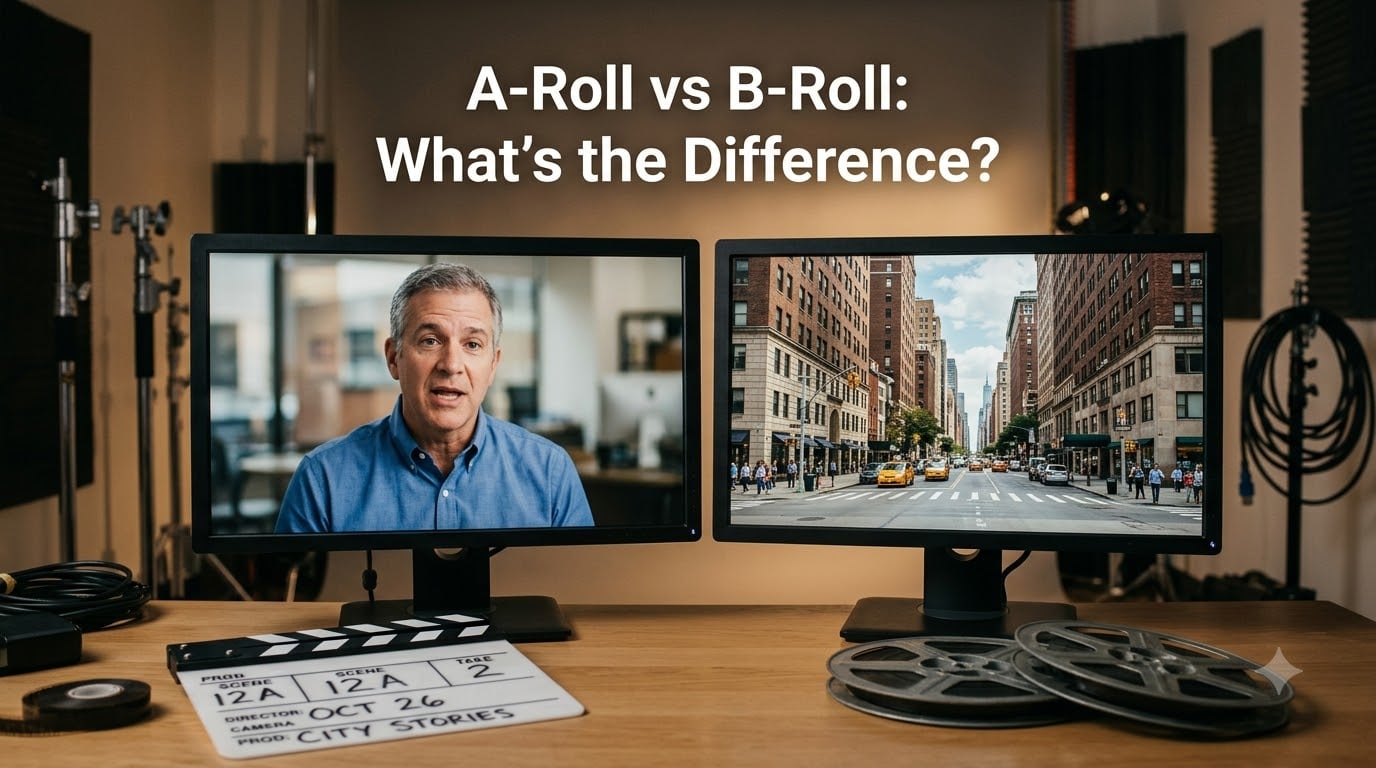
Every film and video you have ever watched is built from two types of footage working together. A-Roll carries your main story, dialogue, and principal action. B-Roll wraps around it with supplemental footage that adds context, mood, and visual interest.
Understanding the difference between A-Roll vs B-Roll is one of the first lessons every filmmaker, editor, and content creator needs to learn. Whether you are producing a documentary, a YouTube video, or a short film, knowing how to shoot and combine these two types of footage will directly affect the quality of your final edit.
I have spent years on film sets and in editing bays, and I can tell you that the A-Roll and B-Roll distinction is not just academic jargon. It shapes how you plan your shoot, organize your footage, and tell your story in post-production.
In this guide, we will break down exactly what each term means, where the names come from, how they differ across video genres, and practical tips for shooting B-Roll that actually serves your story. Let’s start with the basics.
Table of Contents
- What Is A-Roll?
- What Is B-Roll?
- The History Behind A-Roll vs B-Roll
- A-Roll vs B-Roll: Key Differences at a Glance
- How B-Roll Enhances Your Storytelling
- A-Roll and B-Roll in Different Types of Video Production
- Tips for Shooting Great B-Roll
- Common B-Roll Mistakes to Avoid
- What About C-Roll?
- FAQs
- What is the difference between A-Roll and B-Roll video?
- Why do they call it B-Roll?
- Can you give me some examples of A-Roll and B-Roll footage?
- How important is B-Roll?
- What is another word for B-Roll?
- What are common B-Roll mistakes?
- How much B-Roll should I shoot?
- What is the 80 20 rule in video editing?
- Conclusion
What Is A-Roll?
A-Roll is your primary footage. It contains the main action, dialogue, interviews, or subject matter that drives your narrative forward. Think of it as the backbone of your video, the footage you absolutely cannot do without.
In a documentary, your A-Roll would be the sit-down interview with your subject. In a short film, it is the scene where two characters have a conversation. On YouTube, it is the talking-head segment where the host speaks directly to the camera.
Here are the key characteristics of A-Roll footage:
Contains synced dialogue and audio
Features principal characters or the main subject
Drives the core narrative or storyline
Shot during principal photography with the main crew
Typically recorded with production audio from the set
Without solid A-Roll, you have no story to tell. One forum user from r/videography put it perfectly: B-Roll is the icing on the cake, but A-Roll is the cake itself. Without the actual cake, there is nothing to put the icing on.
What Is B-Roll?
B-Roll is supplemental footage intercut with your main shot. It provides visual variety, establishes context, and smooths over edits that would otherwise feel jarring. While A-Roll tells your story, B-Roll shows your story.
B-Roll goes by several other names in the industry. You might hear it called supplemental footage, cutaway shots, insert shots, or simply “B’s” on set. All of these terms refer to the same concept.
Common types of B-Roll footage include:
Establishing shots that set the location or time of day
Cutaway shots that show reactions or relevant objects
Insert shots like close-ups of hands, props, or details
Atmospheric footage of the environment, landscape, or scenery
Pickup shots added after the main shoot to fill gaps
Stock footage licensed from footage libraries
B-Roll is often shot by a second unit crew or captured separately from the main production. It can be recorded with or without synchronized audio, often as MOS footage, meaning sound is recorded separately or not at all for those clips.
The History Behind A-Roll vs B-Roll
The terms A-Roll and B-Roll date back to the era of linear film editing, long before digital non-linear editing systems existed. In those days, editors worked with physical rolls of 16mm or 35mm film on flatbed editors.
Editors used a technique called checkerboard printing to combine footage from two separate film rolls. The A-roll contained the primary footage and the B-roll held the supplemental footage. The two rolls were alternated in a checkerboard pattern, with opaque black leader covering the sections where the other roll’s footage would appear.
When the two rolls were printed together onto a single strip, the checkerboard pattern produced a seamless sequence. The A-roll filled in its sections while the B-roll filled in the gaps, creating a finished edit with no visible splices.
So why do they call it B-Roll? Simply because it was the second roll of film used in the editing process. The name stuck even as technology evolved from physical film through telecine transfers, linear video editing, and into the non-linear editing systems we use today.
In modern post-production, we no longer physically splice film together. But the A-Roll and B-Roll terminology remains the standard way to describe primary versus supplemental footage across the entire film and video industry.
A-Roll vs B-Roll: Key Differences at a Glance
Let’s put these two types of footage side by side so you can see exactly how they compare. None of the top competitors use a comparison table format, so this should give you a quick and clear reference.
Here is a direct breakdown of the A-Roll vs B-Roll difference:
Purpose: A-Roll carries the main story; B-Roll supplements and enhances it
Content: A-Roll features dialogue and principal action; B-Roll shows context, mood, and detail
Audio: A-Roll records production sound; B-Roll is often shot MOS without synced audio
Crew: A-Roll is shot by the main unit; B-Roll may be captured by a second unit
Editing role: A-Roll forms the timeline foundation; B-Roll covers cuts and adds visual variety
Shoot priority: A-Roll is always shot first; B-Roll fills in around the primary schedule
Example: A-Roll is an interview subject speaking; B-Roll is the subject working at their desk
The simplest way to think about it: A-Roll is what your video says, and B-Roll is what your video shows. You need both to create a finished piece that holds attention.
How B-Roll Enhances Your Storytelling
Even though B-Roll sounds secondary, it creates the nuances of visual storytelling. Without it, your audience is stuck watching a static talking head or an unbroken master shot. B-Roll is what turns raw footage into a compelling narrative.
Here is why B-Roll matters for storytelling:
Covers jump cuts: When you trim an interview or dialogue scene, B-Roll hides the edit points and keeps the flow smooth.
Establishes setting: Establishing shots show viewers where they are before diving into the action.
Adds emotional layers: A close-up of clenched hands or a sweeping landscape shot can convey what dialogue cannot.
Provides context: Cutaway shots of relevant objects or locations help viewers understand the subject matter.
Controls pacing: Intercutting B-Roll lets you speed up or slow down the rhythm of a scene without losing continuity.
Gives editing flexibility: More B-Roll means more options in the edit room to shape your story exactly how you want it.
Reality television is a perfect example. Entire shows were raised on B-Roll for transitions and establishing shots. Producers film hours of supplemental footage and then use it to bridge segments, set scenes, and keep the narrative moving.
A-Roll and B-Roll in Different Types of Video Production
The way you use A-Roll and B-Roll changes depending on the type of video you are making. Let’s look at how these concepts apply across different production genres.
Documentary Filmmaking
In documentary production, A-Roll typically consists of interviews with subjects. B-Roll shows the subject in their environment, working, interacting, and living the story the interview describes.
Without strong B-Roll, a documentary becomes a string of talking heads. The supplemental footage is what transports viewers into the world of the subject and makes the story feel real.
News Packages
News segments use A-Roll for the reporter’s on-camera delivery and sound bites from interviews. B-Roll in electronic news-gathering shows the scene, the event, and the people involved.
News editors rely heavily on B-Roll to cover voiceover narration and keep the package visually engaging from start to finish.
Feature Films and Television
In narrative filmmaking, A-Roll covers the main scenes with dialogue and character interaction. B-Roll includes establishing shots, atmospheric footage, second-unit work, and insert shots that enrich the world of the film.
Think of the sweeping landscape shots in a film like Gladiator. Those wide vistas are B-Roll that establishes scale and mood while the dialogue scenes carry the plot.
YouTube and Social Media
For YouTube creators, A-Roll is the main talking-head footage where the host delivers content. B-Roll includes product demonstrations, screen recordings, location shots, and any visual that illustrates what the host is discussing.
The 80/20 rule in video editing suggests that roughly 80 percent of your video’s impact comes from 20 percent of your footage. That high-impact 20 percent is often your B-Roll.
Short Films
Short filmmakers face a unique challenge. You have limited screen time to tell a complete story, which means every second of footage counts. Planning your B-Roll during pre-production is essential, or you will end up with gaps in your edit that you cannot fill.
For short films, I recommend treating B-Roll as a scripted element. Write it into your shot list the same way you would plan your A-Roll scenes. Think about what insert shots, establishing shots, and atmospheric footage your story needs before you ever get to set.
Tips for Shooting Great B-Roll
Shooting effective B-Roll requires a different mindset than shooting your main scenes. Here are practical tips I have gathered from working filmmakers and cinematographers.
Follow these steps to capture B-Roll that actually serves your edit:
Shoot more than you think you need. The most common mistake is not having enough B-Roll in post-production. When in doubt, keep rolling.
Make a dedicated B-Roll shot list. Plan specific shots during pre-production rather than improvising on set.
Vary your shot types. Mix wide shots, medium shots, close-ups, and extreme close-ups to give your editor options.
Slow down and hold each shot. Hold each B-Roll clip for at least 10 to 15 seconds so it is long enough to use in the edit.
Experiment with camera angles and movement. Try low angles, high angles, pans, tilts, and static shots to add visual interest.
Have a clearly defined subject. Every B-Roll shot should illustrate something specific. Random footage that does not connect to your story is wasted effort.
Capture atmospheric and environmental shots. Film the location, the weather, background activity, and anything that establishes mood and place.
Think about transitional shots. Shoot footage that can bridge scenes, like doorways, streets, signage, or motion that suggests movement between locations.
Common B-Roll Mistakes to Avoid
Forum discussions across r/videography, r/NewTubers, and yttalk.com reveal the same B-Roll mistakes over and over. Avoid these pitfalls and your edits will immediately improve.
Not shooting enough B-Roll. The number one complaint from editors. You can always cut footage you do not need, but you cannot create footage you never shot.
Shooting non-illustrative footage. B-Roll that does not relate to the story or subject adds nothing. Every clip should earn its place in the timeline.
No clearly defined subject. A B-Roll shot of an empty room or a random street corner leaves viewers confused. Know what each shot is showing.
Poor organization in post-production. Dumping all B-Roll into one folder makes it impossible to find what you need. Label and categorize clips as you import them.
Holding shots too briefly. A three-second clip is almost useless in editing. Hold your shots long enough to be usable.
Ignoring audio considerations. Even MOS footage can pick up unwanted noise. Be aware of your audio environment even when sound is not the priority.
What About C-Roll?
You may occasionally hear the term C-Roll mentioned in advanced production circles. C-Roll refers to tertiary footage that sits below B-Roll in priority, things like backup angles, experimental shots, or stock footage gathered as insurance.
In practice, most productions only distinguish between A-Roll and B-Roll. But knowing the C-Roll concept can be useful on large shoots where a third camera unit captures supplementary material that may or may not make the final cut.
FAQs
What is the difference between A-Roll and B-Roll video?
A-Roll is your primary footage containing the main action, dialogue, and narrative of your video. B-Roll is supplemental footage that provides context, visual variety, and smooth transitions when intercut with the A-Roll during editing.
Why do they call it B-Roll?
The term comes from the days of linear film editing, when editors used two physical rolls of 16mm film. The A-roll held the primary footage and the B-roll held supplemental footage. The two were combined using a checkerboard printing technique. The B-roll name stuck even as editing moved to digital systems.
Can you give me some examples of A-Roll and B-Roll footage?
A-Roll examples include an interview subject speaking on camera, two actors performing a dialogue scene, or a YouTube host talking directly to the lens. B-Roll examples include establishing shots of a building, close-ups of hands working, landscape scenery, crowd reactions, and insert shots of props or objects relevant to the story.
How important is B-Roll?
B-Roll is essential for effective video production. It covers jump cuts during editing, establishes setting and mood, adds visual interest to talking-head segments, provides context for the story, controls pacing, and gives editors flexibility to shape the narrative. Without B-Roll, most videos feel flat and monotonous.
What is another word for B-Roll?
B-Roll is also called supplemental footage, cutaway shots, insert shots, secondary footage, or simply B’s on a film set. In news production it may be referred to as cover footage. All of these terms refer to the same concept of footage that supports and enhances the primary A-Roll.
What are common B-Roll mistakes?
The most common B-Roll mistakes include not shooting enough footage, shooting clips that do not illustrate the story, having no clearly defined subject for each shot, poor organization in post-production, holding shots too briefly to be usable, and ignoring audio environment even when recording MOS footage.
How much B-Roll should I shoot?
A good rule of thumb is to shoot significantly more B-Roll than you think you will need. Many experienced editors recommend a ratio of at least 3 to 1, meaning three minutes of B-Roll for every minute of A-Roll. You can always discard extra footage, but you cannot create clips you never recorded.
What is the 80 20 rule in video editing?
The 80/20 rule in video editing suggests that roughly 80 percent of your video’s impact comes from 20 percent of your footage. In practice, this means your most carefully chosen A-Roll moments and strategically placed B-Roll clips carry the majority of the viewer’s attention and emotional response.
Conclusion
The difference between A-Roll vs B-Roll comes down to this: A-Roll is your story, and B-Roll is how you show it. A-Roll carries the dialogue, the principal action, and the narrative thread. B-Roll adds the context, mood, and visual variety that transforms raw footage into a finished piece worth watching.
The terms come from the physical film era when editors literally used two rolls of film in a checkerboard pattern. Today we edit on digital timelines, but the concepts remain exactly the same. Your A-Roll forms the foundation and your B-Roll fills in the world around it.
For short filmmakers especially, the takeaway is simple. Plan your B-Roll during pre-production, shoot more than you think you need, and give every clip a clearly defined purpose. Write B-Roll into your shot list the same way you plan your main scenes.
Here is your quick B-Roll checklist for your next shoot:
Make a dedicated B-Roll shot list during pre-production
Shoot at least a 3-to-1 ratio of B-Roll to A-Roll
Vary your shot types, angles, and durations
Hold each shot for 10 to 15 seconds minimum
Give every clip a clearly defined subject
Capture establishing shots, atmospheric footage, and transitional clips
Label and organize all B-Roll clips as you import them
Master the relationship between A-Roll and B-Roll and your edits will immediately feel more professional, more engaging, and more cinematic. Now grab your camera and start shooting.